一、安装数据库

[root@server10 ~]# dnf -y install mariadb-server mariadb(安装数据库的服务端和客户端)
[root@server11 ~]# systemctl enable --now mariadb 重启数据库,并设置开机启动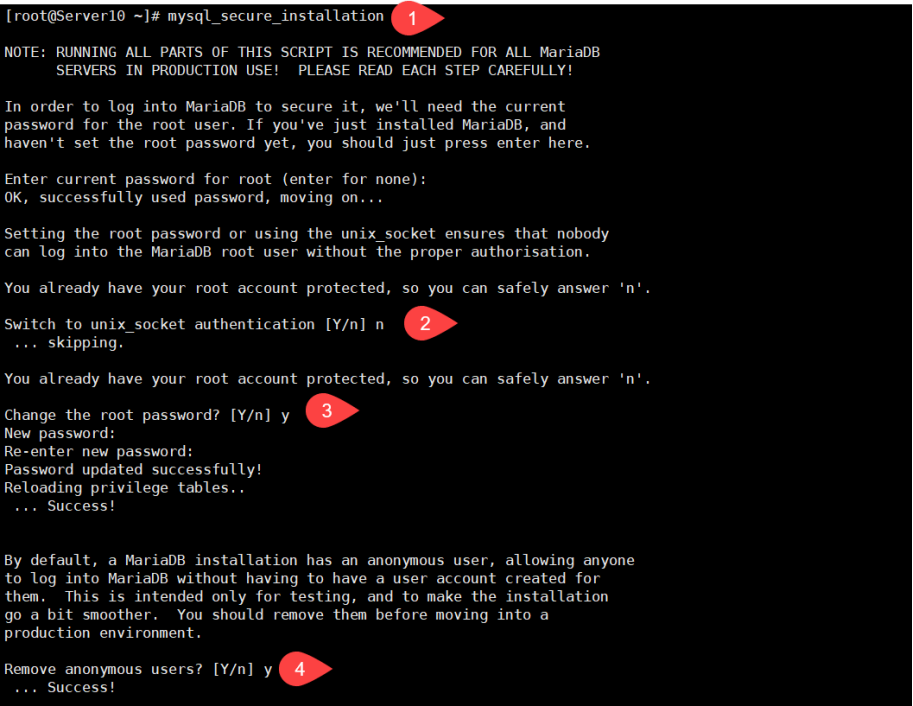
Switch to unix_socket authentication [Y/n] n(交换切换到交换机接口认证吗?不)
 ... skipping.

You already have your root account protected, so you can safely answer 'n'.

Change the root password? [Y/n] y(更改数据库管理员密码吗?是)
New password:
Re-enter new password:
Password updated successfully!
Reloading privilege tables..
 ... Success!


By default, a MariaDB installation has an anonymous user, allowing anyone
to log into MariaDB without having to have a user account created for
them.  This is intended only for testing, and to make the installation
go a bit smoother.  You should remove them before moving into a
production environment.

Remove anonymous users? [Y/n] y(移除匿名用户吗?是)
 ... Success!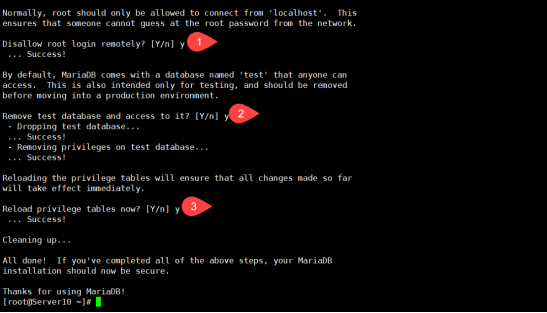
Normally, root should only be allowed to connect from 'localhost'.  This
ensures that someone cannot guess at the root password from the network.

Disallow root login remotely? [Y/n] y(禁止root远程登录吗?是)
 ... Success!

By default, MariaDB comes with a database named 'test' that anyone can
access.  This is also intended only for testing, and should be removed
before moving into a production environment.

Remove test database and access to it? [Y/n] y(移除测试数据库吗?是)
 - Dropping test database...
 ... Success!
 - Removing privileges on test database...
 ... Success!

Reloading the privilege tables will ensure that all changes made so far
will take effect immediately.

Reload privilege tables now? [Y/n] y(重新加载数据表吗?是)
 ... Success!

Cleaning up...

All done!  If you've completed all of the above steps, your MariaDB
installation should now be secure.

Thanks for using MariaDB!
[root@server10 ~]# 
[root@server10 ~]# vim /etc/my.cnf.d/mariadb-server.cnf(编辑数据库服务端配置文件)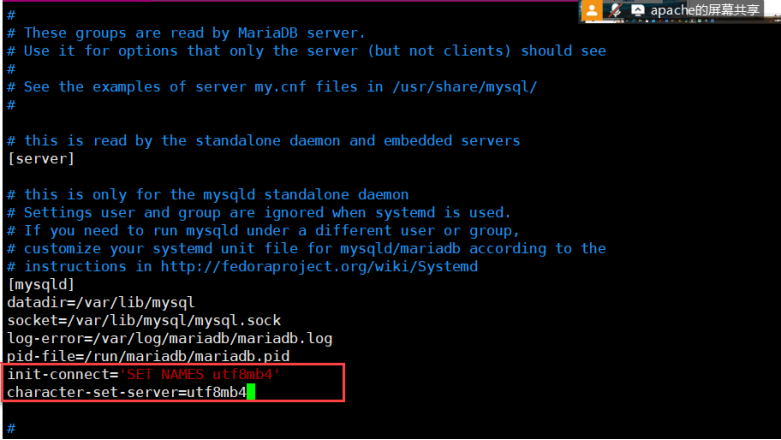
init-connect='SET NAMES utf8mb4'(初始连接设置“utf8mb4”编码)
character-set-server=utf8mb4(设置服务端的字符编码为“utf8mb4”)
[root@server10 ~]# systemctl restart mariadb(重启数据库)
[root@server10 ~]# systemctl enable --now mariadb(启动数据库并设置开机启动)
Created symlink /etc/systemd/system/mysql.service → /usr/lib/systemd/system/mariadb.service.
Created symlink /etc/systemd/system/mysqld.service → /usr/lib/systemd/system/mariadb.service.
Created symlink /etc/systemd/system/multi-user.target.wants/mariadb.service → /usr/lib/systemd/system/mariadb.service.
[root@server10 ~]#
[root@server10 ~]# firewall-cmd --add-port=3306/tcp(在防火墙里添加tcp的3306端口)
success
[root@server10 ~]# firewall-cmd --runtime-to-permanent(在防火墙里永久添加运行时)
Success
[root@server10 ~]# firewall-cmd --list-all(查看防火墙的所有规则)
public (active)
  target: default
  icmp-block-inversion: no
  interfaces: ens160
  sources:
  services: cockpit dhcpv6-client ssh
  ports(端口): 3306/tcp
二、数据库创建和查询
2.1 导入及查询employees员工数据表
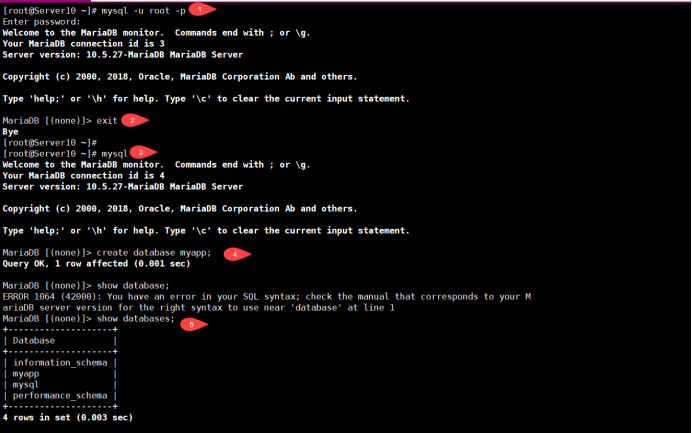
[root@server10 ~]# mysql -u root -p(数据库管理员登录数据库)
Enter password:
Welcome to the MariaDB monitor.  Commands end with ; or \g.
Your MariaDB connection id is 3
Server version: 10.5.27-MariaDB MariaDB Server

Copyright (c) 2000, 2018, Oracle, MariaDB Corporation Ab and others.

Type 'help;' or '\h' for help. Type '\c' to clear the current input statement.

MariaDB [(none)]> exit(退出)
Bye
[root@server10 ~]# mysql(Linux管理员登录数据库)
Welcome to the MariaDB monitor.  Commands end with ; or \g.
Your MariaDB connection id is 4
Server version: 10.5.27-MariaDB MariaDB Server

Copyright (c) 2000, 2018, Oracle, MariaDB Corporation Ab and others.

Type 'help;' or '\h' for help. Type '\c' to clear the current input statement.


MariaDB [(none)]> create database myapp;(创建myapp数据库)
Query OK, 1 row affected (0.000 sec)

MariaDB [(none)]> show databases;(查看数据库)
| Database           |
+--------------------+
| information_schema |
| myapp              |
| mysql              |
| performance_schema |
+--------------------+
4 rows in set (0.008 sec)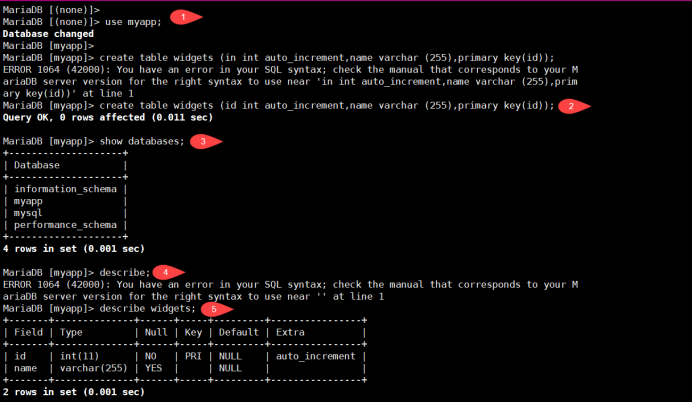
MariaDB [(none)]>
MariaDB [(none)]> use myapp;(使用myapp数据库)
Database changed
MariaDB [myapp]> create table widgets (id int auto_increment,name varchar(255),primary key(id));(创建widgets表,ID整数类型可以自动增长,name为字符串类型,设置ID为组件)
Query OK, 0 rows affected (0.005 sec)

MariaDB [myapp]> show tables;(查看数据表)
+-----------------+
| Tables_in_myapp |
+-----------------+
| widgets         |
+-----------------+
1 row in set (0.000 sec)

MariaDB [myapp]> describe widgets;(查看widget表的结构)
+-------+--------------+------+-----+---------+----------------+
| Field | Type         | Null | Key | Default | Extra          |
+-------+--------------+------+-----+---------+----------------+
| id    | int(11)      | NO   | PRI | NULL    | auto_increment |
| name  | varchar(255) | YES  |     | NULL    |                |
+-------+--------------+------+-----+---------+----------------+
2 rows in set (0.001 sec)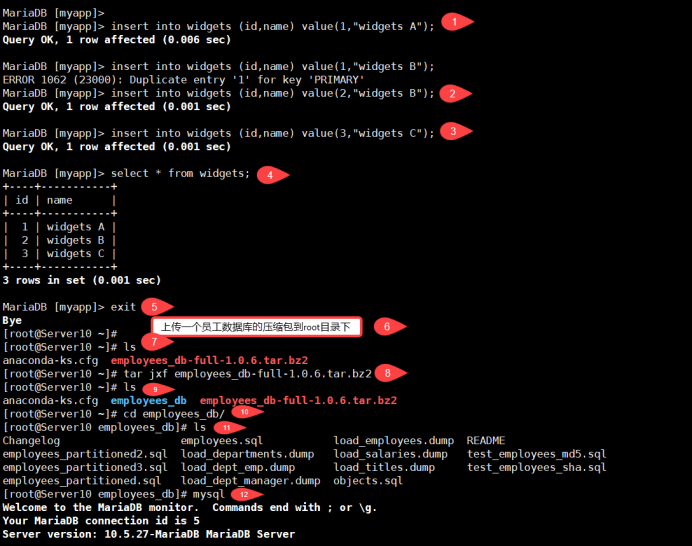
MariaDB [myapp]> insert into widgets (id,name) values(1,"widget A");(向widget表中插入数据,ID为1,名字为widget A)
Query OK, 1 row affected (0.010 sec)

MariaDB [myapp]> insert into widgets (id,name) values(2,"widget B");(向widget表中插入数据,ID为1,名字为widget B)
Query OK, 2 row affected (0.001 sec)

MariaDB [myapp]> insert into widgets (id,name) values(3,"widget C");(向widget表中插入数据,ID为3,名字为widget C)
Query OK, 1 row affected (0.001 sec)

MariaDB [myapp]> select * from widgets;(查询widget表中所有数据)
+----+----------+
| id | name     |
+----+----------+
|  1 | widget A |
|  2 | widget B |
|  3 | widget C |
+----+----------+
3 rows in set (0.002 sec)

MariaDB [myapp]>


[root@server10 ~]# tar jxf employees_db-full-1.0.6.tar.bz2 (tar包解压员工的数据包)
[root@server10 ~]#
[root@server10 ~]# ls
anaconda-ks.cfg  employees_db  employees_db-full-1.0.6.tar.bz2
[root@server10 ~]#
[root@server10 ~]# cd employees_db/(进入employees_db/目录)
[root@server10 employees_db]# ls
Changelog                   employees.sql           load_employees.dump  README
employees_partitioned2.sql  load_departments.dump   load_salaries.dump   test_employees_md5.sql
employees_partitioned3.sql  load_dept_emp.dump      load_titles.dump     test_employees_sha.sql
employees_partitioned.sql   load_dept_manager.dump  objects.sql
[root@server10 employees_db]# mysql(登录数据库)
Welcome to the MariaDB monitor.  Commands end with ; or \g.
Your MariaDB connection id is 5
Server version: 10.5.27-MariaDB MariaDB Server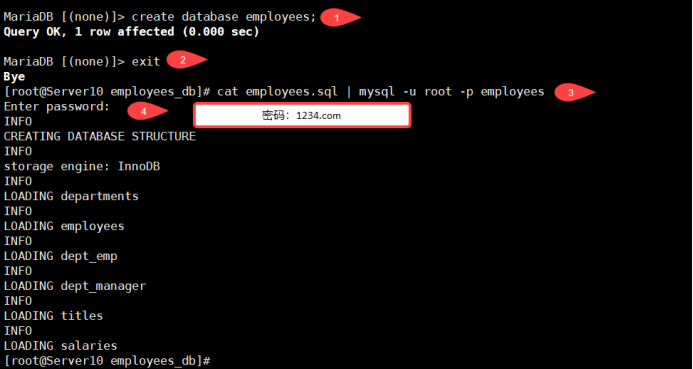
MariaDB [(none)]> create database employees;(创建员工数据库)
Query OK, 1 row affected (0.000 sec)

MariaDB [(none)]> exit(退出)
Bye
[root@server10 employees_db]# cat employees.sql | mysql -u root -p employees(将员工数据库文件导入员工数据库中)
Enter password:
INFO
CREATING DATABASE STRUCTURE
INFO
storage engine: InnoDB
INFO
LOADING departments
INFO
LOADING employees
INFO
LOADING dept_emp
INFO
LOADING dept_manager
INFO
LOADING titles
INFO
LOADING salaries
[root@server10 employees_db]# 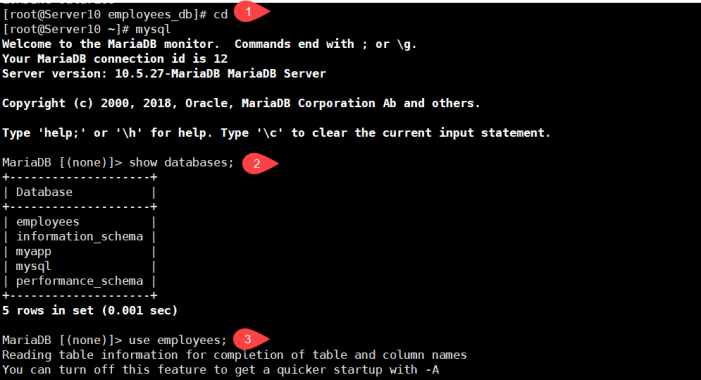
[root@server10 ~]# mysql(登录数据库)
Welcome to the MariaDB monitor.  Commands end with ; or \g.
Your MariaDB connection id is 7
Server version: 10.5.27-MariaDB MariaDB Server

Copyright (c) 2000, 2018, Oracle, MariaDB Corporation Ab and others.

Type 'help;' or '\h' for help. Type '\c' to clear the current input statement.

MariaDB [(none)]> show databases;(查询数据库)
+--------------------+
| Database           |
+--------------------+
| employees          |
| information_schema |
| myapp              |
| mysql              |
| performance_schema |
+--------------------+
5 rows in set (0.000 sec)

MariaDB [(none)]> use employees;(使用员工数据库)
Reading table information for completion of table and column names
You can turn off this feature to get a quicker startup with -A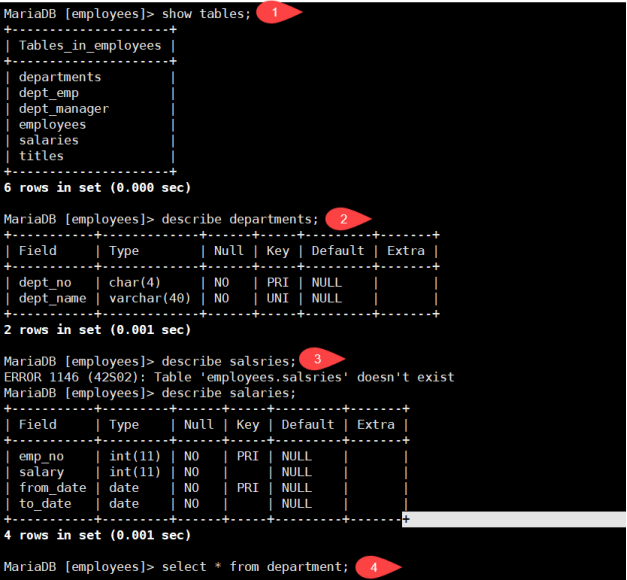
[root@server10 ~]# mysql(登录数据库)
Welcome to the MariaDB monitor.  Commands end with ; or \g.
Your MariaDB connection id is 7
Server version: 10.5.27-MariaDB MariaDB Server

Copyright (c) 2000, 2018, Oracle, MariaDB Corporation Ab and others.

Type 'help;' or '\h' for help. Type '\c' to clear the current input statement.

MariaDB [(none)]> show databases;(查询数据库)
+--------------------+
| Database           |
+--------------------+
| employees          |
| information_schema |
| myapp              |
| mysql              |
| performance_schema |
+--------------------+
5 rows in set (0.000 sec)

MariaDB [(none)]> use employees;(使用员工数据库)
Reading table information for completion of table and column names
You can turn off this feature to get a quicker startup with -A

Database changed
MariaDB [employees]> show tables;(查询表)
+---------------------+
| Tables_in_employees |
+---------------------+
| departments         |
| dept_emp            |
| dept_manager        |
| employees           |
| salaries            |
| titles              |
+---------------------+
6 rows in set (0.001 sec)

MariaDB [employees]> describe departments;(查询部门表结构)
+-----------+-------------+------+-----+---------+-------+
| Field     | Type        | Null | Key | Default | Extra |
+-----------+-------------+------+-----+---------+-------+
| dept_no   | char(4)     | NO   | PRI | NULL    |       |
| dept_name | varchar(40) | NO   | UNI | NULL    |       |
+-----------+-------------+------+-----+---------+-------+


MariaDB [employees]> describe salaries;(查询薪水表结构)
+-----------+---------+------+-----+---------+-------+
| Field     | Type    | Null | Key | Default | Extra |
+-----------+---------+------+-----+---------+-------+
| emp_no    | int(11) | NO   | PRI | NULL    |       |
| salary    | int(11) | NO   |     | NULL    |       |
| from_date | date    | NO   | PRI | NULL    |       |
| to_date   | date    | NO   |     | NULL    |       |
+-----------+---------+------+-----+---------+-------+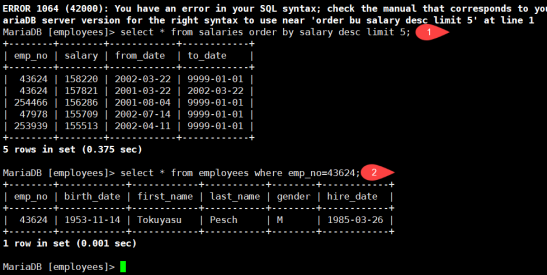
MariaDB [employees]> select * from salaries order by salary desc limit 5;(查询薪水表中薪水最高的前五名)
+--------+--------+------------+------------+
| emp_no | salary | from_date  | to_date    |
+--------+--------+------------+------------+
|  43624 | 158220 | 2002-03-22 | 9999-01-01 |
|  43624 | 157821 | 2001-03-22 | 2002-03-22 |
| 254466 | 156286 | 2001-08-04 | 9999-01-01 |
|  47978 | 155709 | 2002-07-14 | 9999-01-01 |
| 253939 | 155513 | 2002-04-11 | 9999-01-01 |
+--------+--------+------------+------------+
5 rows in set (0.935 sec)

MariaDB [employees]> select * from employees where emp_no=43624;(查询员工编号43624员工的详细信息)
+--------+------------+------------+-----------+--------+------------+
| emp_no | birth_date | first_name | last_name | gender | hire_date  |
+--------+------------+------------+-----------+--------+------------+
|  43624 | 1953-11-14 | Tokuyasu   | Pesch     | M      | 1985-03-26 |
+--------+------------+------------+-----------+--------+------------+
1 row in set (0.001 sec)
2.2 创建class班级数据库

MariaDB [employees]> create database class;(创建班级数据库)
Query OK, 1 row affected (0.000 sec)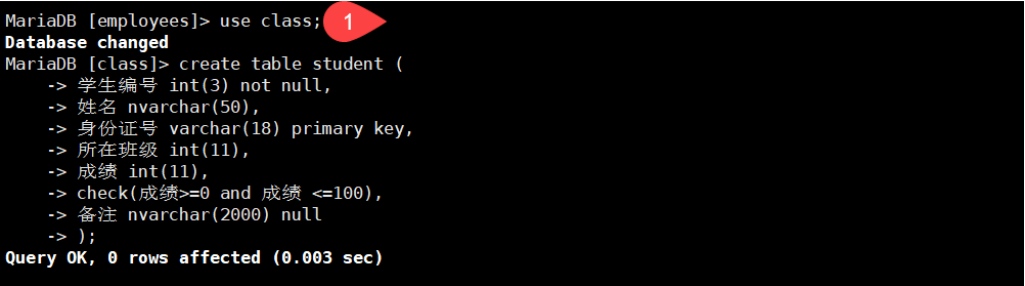
MariaDB [employees]> use class;(使用班级数据库)
Database changed
MariaDB [class]> create table student (             注意:这里有个半括号       (创建学生表)
    -> 学生编号 int(3) not null,                   (学生编号整数类型长度是三,不允许)
    -> 姓名 nvarchar(50),                          (姓名是字符串类型,长度50)
    -> 身份证号 varchar(18) primary key,           (身份证字符串类型长度18,设置为主键)
    -> 所在班级 int(11),                           (所在班级整数类型是11)
    -> 成绩 int(11),                               (成绩整数类型是11)
    -> check(成绩 >=0 and 成绩 <=100),             (成绩创建约束为大于等于0小于等于100)
    -> 备注 nvarchar(2000) null                    (备注设置为字符串类型,长度是2000,可以为空)
    -> );
Query OK, 0 rows affected (0.009 sec)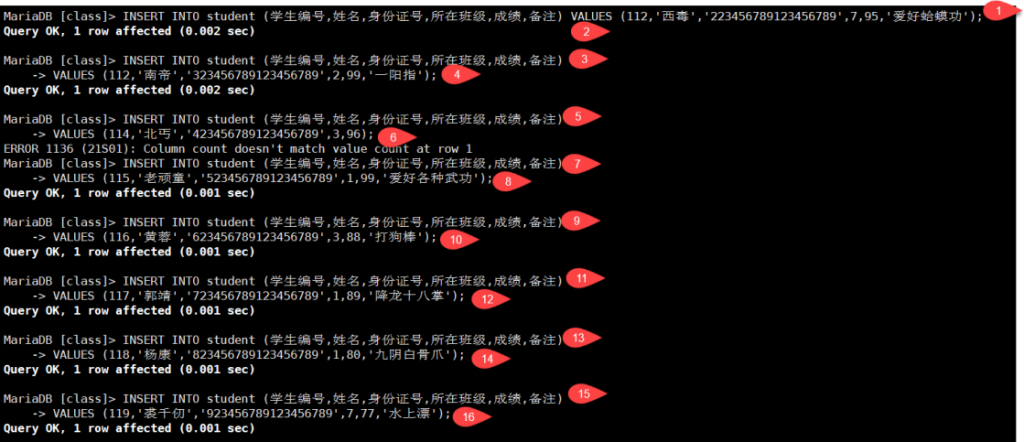


INSERT INTO student (学生编号,姓名,身份证号,所在班级,成绩,备注)
VALUES (112,'西毒','223456789123456789',7,95,'爱好蛤蟆功');


INSERT INTO student (学生编号,姓名,身份证号,所在班级,成绩,备注)
VALUES (113,'南帝','323456789123456789',2,99,'一阳指');


INSERT INTO student (学生编号,姓名,身份证号,所在班级,成绩,备注)
VALUES (115,'老顽童','523456789123456789',1,99,'爱好各种武功');


INSERT INTO student (学生编号,姓名,身份证号,所在班级,成绩,备注)
VALUES (116,'黄蓉','623456789123456789',3,88,'打狗棒');


INSERT INTO student (学生编号,姓名,身份证号,所在班级,成绩,备注)
VALUES (117,'郭靖','723456789123456789',1,89,'降龙十八掌');


INSERT INTO student (学生编号,姓名,身份证号,所在班级,成绩,备注)
VALUES (118,'杨康','823456789123456789',1,80,'九阴白骨爪');


INSERT INTO student (学生编号,姓名,身份证号,所在班级,成绩,备注)
VALUES (119,'裘千仞','923456789123456789',7,77,'水上漂');


INSERT INTO student (学生编号,姓名,身份证号,所在班级,成绩)
VALUES (120,'丘处机','213456789123456789',5,87);

INSERT INTO student (学生编号,姓名,身份证号,所在班级,成绩)
VALUES (114,'北丐','423456789123456789',3,96);


INSERT INTO student (学生编号,姓名,身份证号,所在班级,成绩)
VALUES (111,'东邪',123456789123456789,2,90);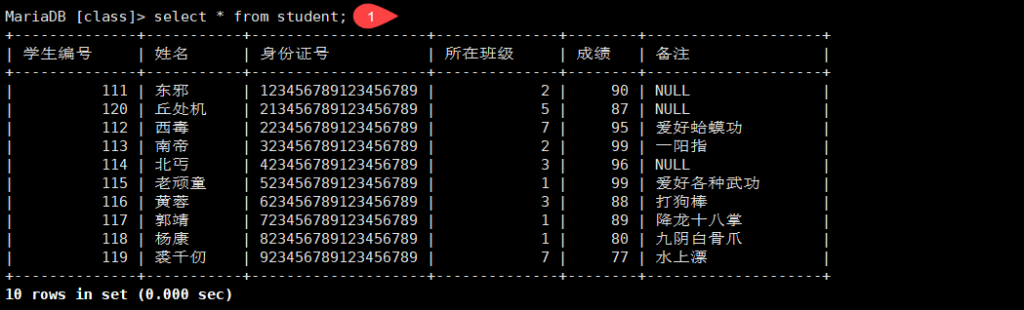
查询student表中成绩低于90分或者高于95分的学生所有信息;

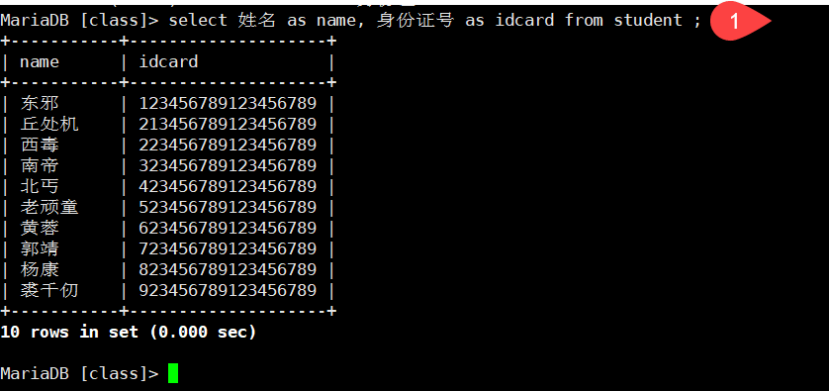
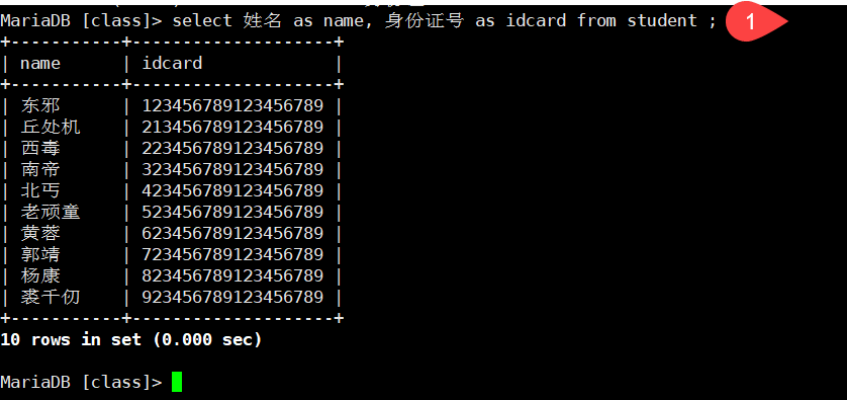
查询student表中“姓名”和“身份证号”两列数据,查询结果“姓名”列名称显示为name,“身份证号”列名称显示为“idcard”
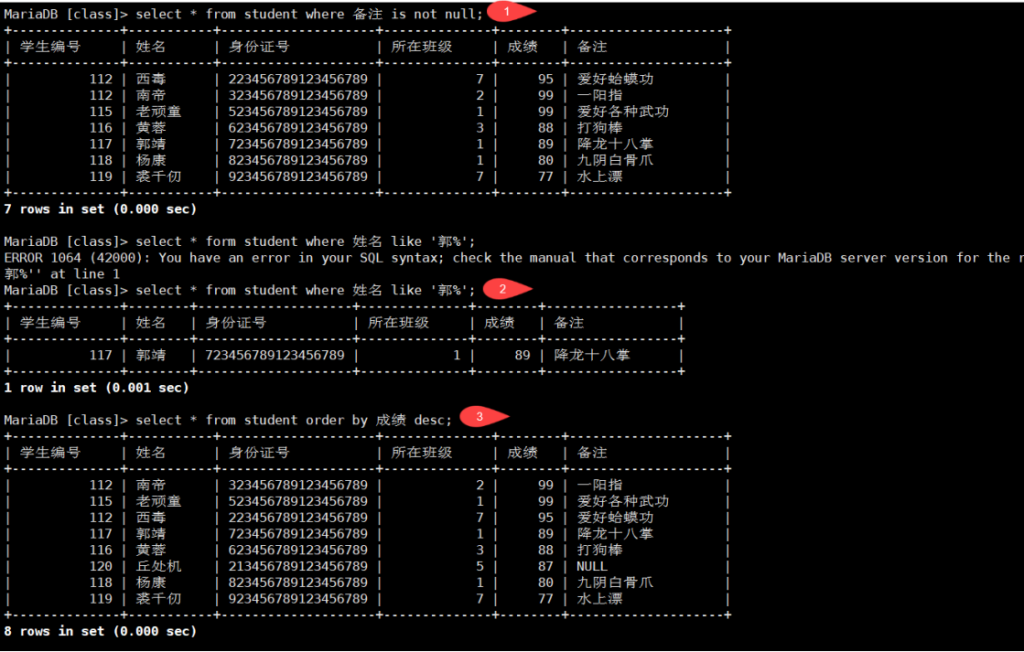
查询student表中备注不为空的学生所有信息
查询student表中姓郭的学生所有信息
查询student表中所有学生的信息,按照成绩从高到底显示查询结果
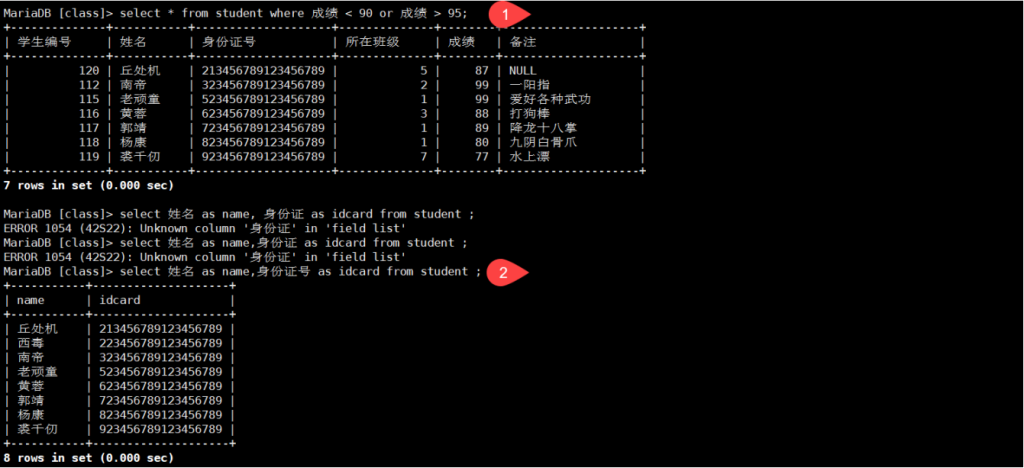
查询student表中成绩低于90分或者高于95分的学生所有信息;
查询student表中“姓名”和“身份证号”两列数据,查询结果“姓名”列名称显示为name,“身份证号”列名称显示为“idcard”
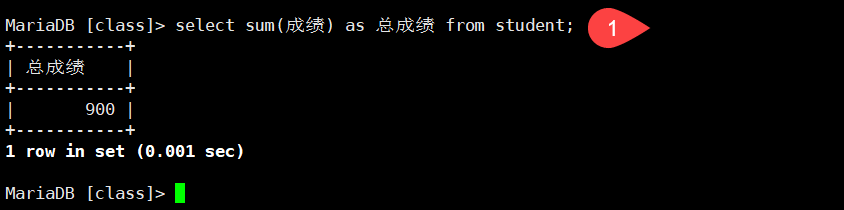
查询student表中所有学生的总成绩
查询student表中每个班级的总成绩
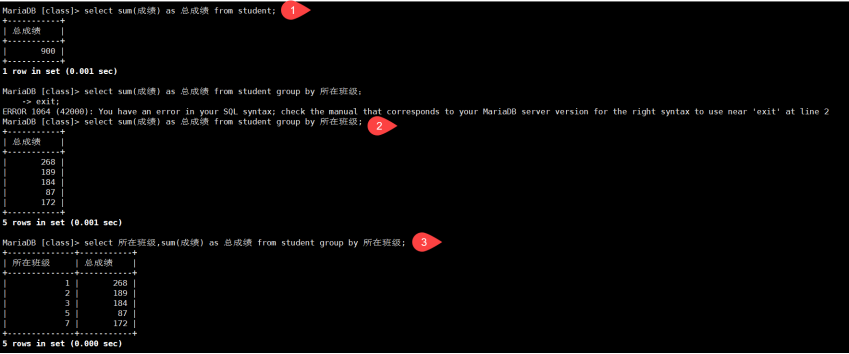
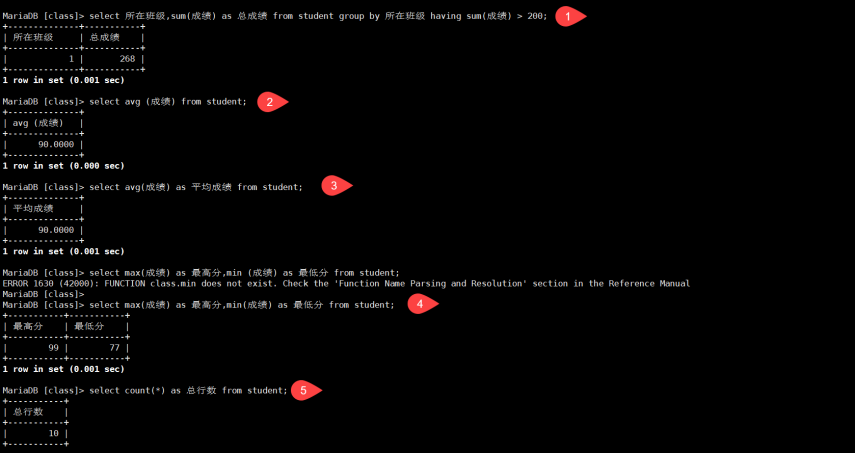
查询student表中每个班级的总成绩大于200的班级;
查询student表中所有学生的平均成绩;
查询student表中所有学生的最高分和最低分
查询student表中所有行数
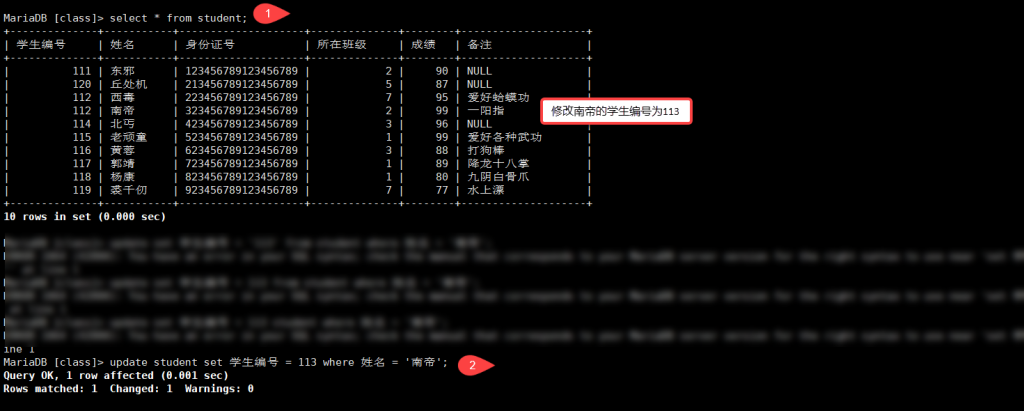
MariaDB [class]> select * from student;
+--------------+-----------+--------------------+--------------+--------+--------------------+
| 学生编号     | 姓名      | 身份证号           | 所在班级     | 成绩   | 备注               |
+--------------+-----------+--------------------+--------------+--------+--------------------+
|          111 | 东邪      | 123456789123456789 |            2 |     90 | NULL               |
|          120 | 丘处机    | 213456789123456789 |            5 |     87 | NULL               |
|          112 | 西毒      | 223456789123456789 |            7 |     95 | 爱好蛤蟆功         |
|          112 | 南帝      | 323456789123456789 |            2 |     99 | 一阳指             |
|          114 | 北丐      | 423456789123456789 |            3 |     96 | NULL               |
|          115 | 老顽童    | 523456789123456789 |            1 |     99 | 爱好各种武功       |
|          116 | 黄蓉      | 623456789123456789 |            3 |     88 | 打狗棒             |
|          117 | 郭靖      | 723456789123456789 |            1 |     89 | 降龙十八掌         |
|          118 | 杨康      | 823456789123456789 |            1 |     80 | 九阴白骨爪         |
|          119 | 裘千仞    | 923456789123456789 |            7 |     77 | 水上漂             |
+--------------+-----------+--------------------+--------------+--------+--------------------+
MariaDB [class]> update student set 学生编号 = 113 where 姓名 = '南帝';
Query OK, 1 row affected (0.001 sec)
Rows matched: 1  Changed: 1  Warnings: 0