db1: 192.168.7.10 主
db2: 192.168.7.11 从

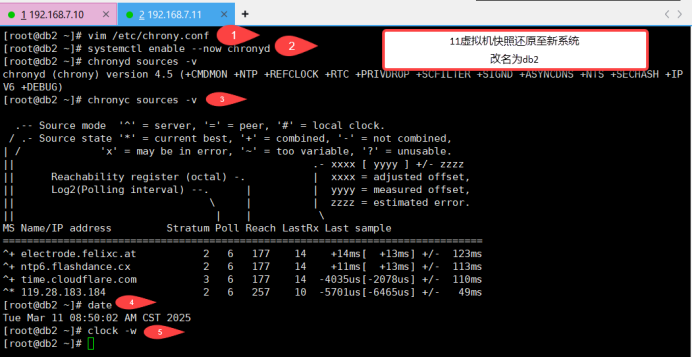
[root@server10 ~]# vim /etc/chrony.conf 编辑时间同步配置文件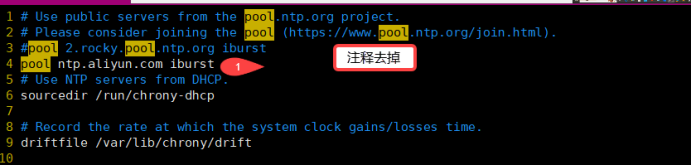
pool ntp.aliyun.com iburst 同步阿里云的时间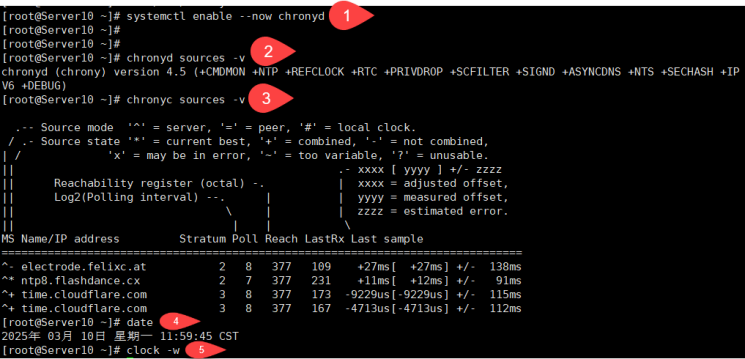
[root@server10 ~]# systemctl enable --now chronyd 启动时间同步并设置开机启动
Created symlink /etc/systemd/system/multi-user.target.wants/chronyd.service → /usr/lib/systemd/system/chronyd.service.
[root@server10 ~]#
[root@server10 ~]# chronyc sources -v			运行时间同步

  .-- Source mode  '^' = server, '=' = peer, '#' = local clock.
 / .- Source state '*' = current best, '+' = combined, '-' = not combined,
| /             'x' = may be in error, '~' = too variable, '?' = unusable.
||                                                 .- xxxx [ yyyy ] +/- zzzz
||      Reachability register (octal) -.           |  xxxx = adjusted offset,
||      Log2(Polling interval) --.      |          |  yyyy = measured offset,
||                                \     |          |  zzzz = estimated error.
||                                 |    |           \
MS Name/IP address         Stratum Poll Reach LastRx Last sample
===============================================================================
^* 203.107.6.88                  2   6    17     1  +1025us[+1170us] +/-   14ms
[root@server10 ~]#
[root@server10 ~]# date		查看时间日期
Mon Mar 10 11:56:43 AM CST 2025
[root@server10 ~]#
[root@server10 ~]# clock -w	将时间日期保存到系统中
[root@server10 ~]# vim /etc/my.cnf.d/mariadb-server.cnf 编辑数据库的主配置文件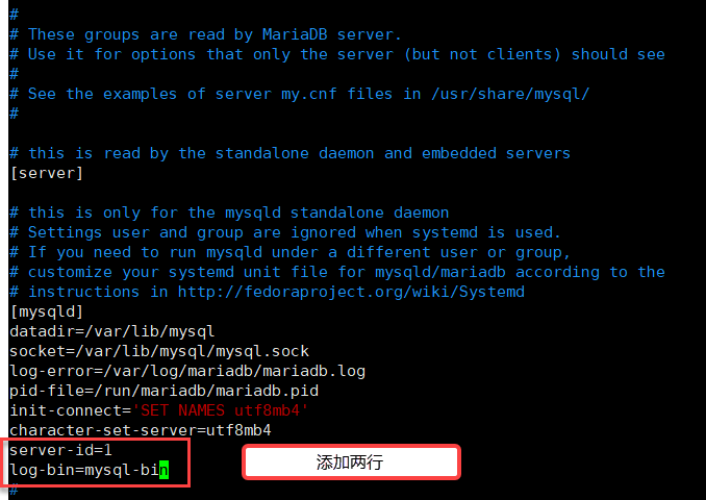
[mysqld]

server-id=1						设置服务器的id号为1(表示他是主数据库)
log-bin=mysql-bin				开启二进制日志
[root@server10 ~]# systemctl restart mariadb 重启数据库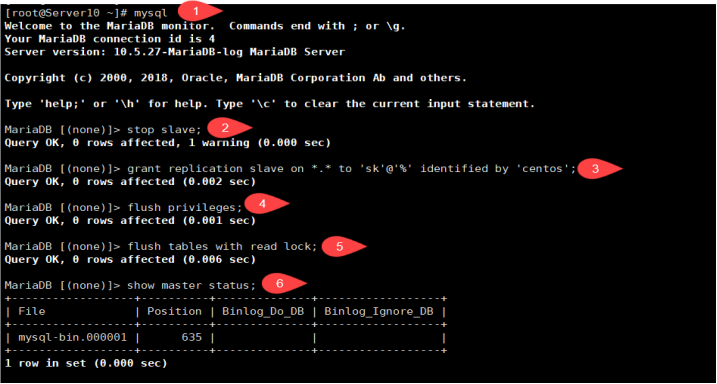
[root@server10 ~]# mysql						登录数据库
Welcome to the MariaDB monitor.  Commands end with ; or \g.
Your MariaDB connection id is 4
Server version: 10.5.27-MariaDB-log MariaDB Server

Copyright (c) 2000, 2018, Oracle, MariaDB Corporation Ab and others.

Type 'help;' or '\h' for help. Type '\c' to clear the current input statement.

MariaDB [(none)]> stop slave;					停止从数据库
Query OK, 0 rows affected, 1 warning (0.000 sec)

MariaDB [(none)]> grant replication slave on *.* to 'sk'@'%' identified by 'centos';	将数据库的所有内容全部授权给从数据库 复制授权的内容为sk 允许从任何IP访问,认证的密码为centos,
Query OK, 0 rows affected (0.002 sec)

MariaDB [(none)]> flush privileges;		刷新授权
Query OK, 0 rows affected (0.001 sec)

MariaDB [(none)]> flush tables with read lock;		刷新表的读锁定
Query OK, 0 rows affected (0.001 sec)

MariaDB [(none)]> show master status;			查看主数据库的状态
+------------------+----------+--------------+------------------+
| File             | Position | Binlog_Do_DB | Binlog_Ignore_DB |
+------------------+----------+--------------+------------------+
| mysql-bin.000001 |      635 |              |                  |日志文件的名字			日志文件的位置
+------------------+----------+--------------+------------------+
1 row in set (0.000 sec)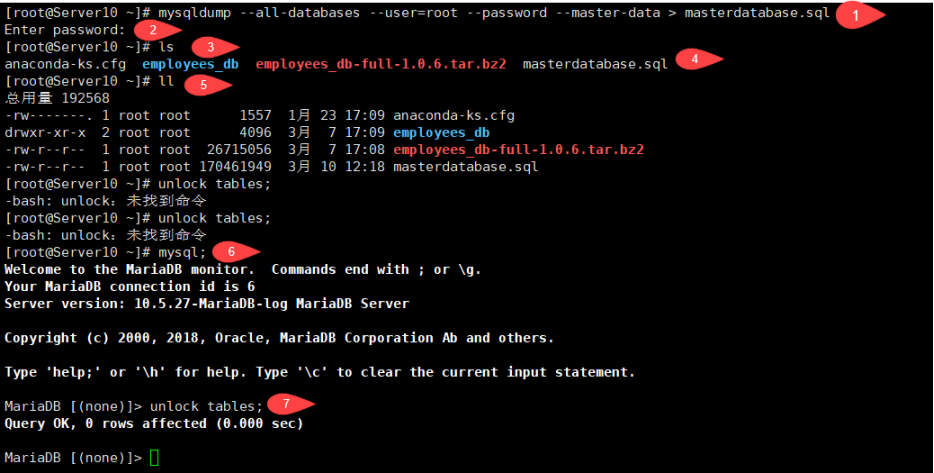
[root@server10 ~]# mysqldump --all-databases --user=root --password --master-data > masterdatabase.sql						将所有数据库全部备份出来		备份的名称masterdatabase.sql		--user=root数据库的用户 	--password数据库的密码	--master-data指向主数据
Enter password:
[root@server10 ~]# ls
anaconda-ks.cfg  employees_db  employees_db-full-1.0.6.tar.bz2  masterdatabase.sql
[root@server10 ~]# ll
total 192568
-rw-------. 1 root root      1494 Feb 17 10:00 anaconda-ks.cfg
drwxr-xr-x  2 root root      4096 Mar  7 09:07 employees_db
-rw-r--r--  1 root root  26715056 Feb 19  2016 employees_db-full-1.0.6.tar.bz2
-rw-r--r--  1 root root 170461946 Mar 10 12:18 masterdatabase.sql


[root@server10 ~]# mysql				登录数据库
Welcome to the MariaDB monitor.  Commands end with ; or \g.
Your MariaDB connection id is 6
Server version: 10.5.27-MariaDB-log MariaDB Server

Copyright (c) 2000, 2018, Oracle, MariaDB Corporation Ab and others.

Type 'help;' or '\h' for help. Type '\c' to clear the current input statement.

MariaDB [(none)]> unlock tables;		解锁表
Query OK, 0 rows affected (0.000 sec)
MariaDB [(none)]> quit
'Bye




[root@db2 ~]# vim /etc/my.cnf.d/mariadb-server.cnf 编辑数据库的主配置文件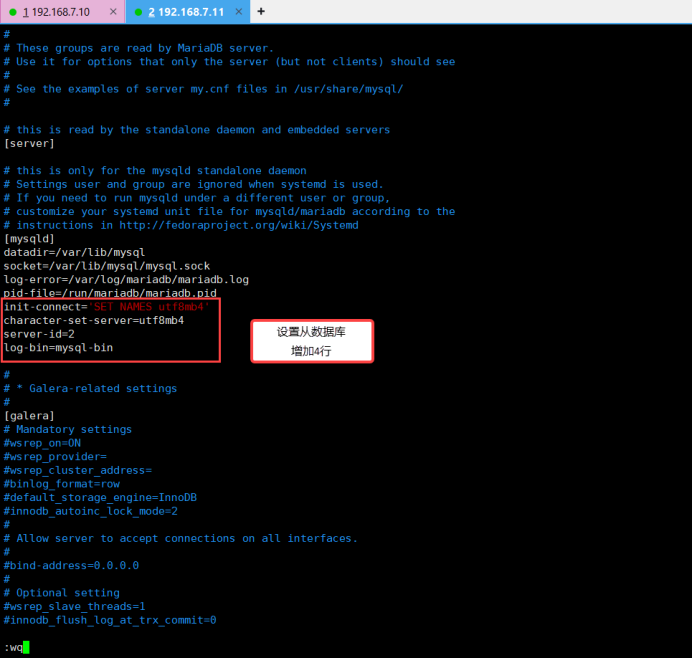
init-connect='SET NAMES utf8mb4'					初始链接设置utf8mb4的中文编码(不然插入数据都是??? 不识别)
character-set-server=utf8mb4						在字符设置服务器的编码为utf8mb4

server-id=2										从数据库
log-bin=mysql-bin								  开启二进制日志
[root@db2 ~]# systemctl restart mariadb 重启数据库