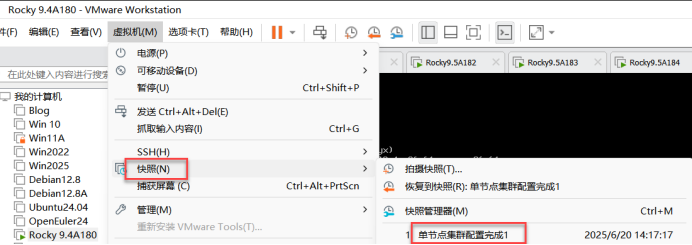
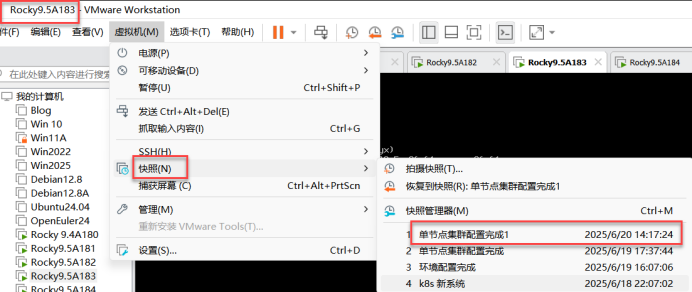
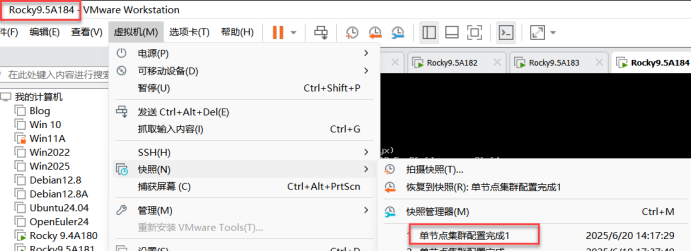
一、实验环境:6台Rocky Linux虚拟机
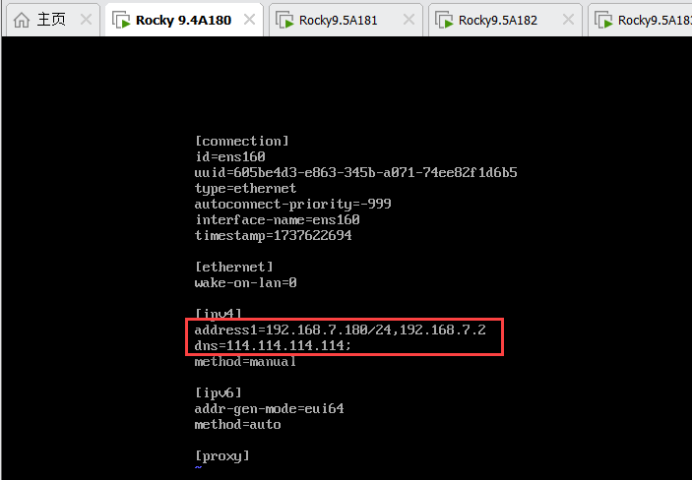
192.168.7.180 master1
192.168.7.181 master2
192.168.7.182 master3
192.168.7.183 node1
192.168.7.184 node2
192.168.7.185 nfs
内存:8G、处理器:4核、网卡:VMnet8
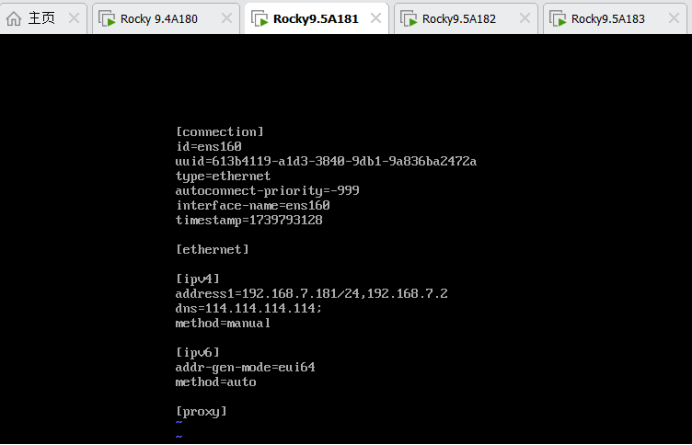
修改网卡信息:

二、修改hosts文件
[root@1-5 ~]# vim /etc/hosts		修改hosts文件
添加所有节点IP地址与计算机名之间的映射
192.168.7.180 master1
192.168.7.181 master2
192.168.7.182 master3
192.168.7.183 node1
192.168.7.184 node2
三、时间同步:
[root@master1-5 ~]# vim /etc/chrony.conf		编辑时间同步配置文件
#pool 2.rocky.pool.ntp.org iburst
pool ntp.aliyun.com iburst
[root@1-5 ~]# systemctl enable --now chronyd
[root@1-5 ~]# chronyc sources -v

  .-- Source mode  '^' = server, '=' = peer, '#' = local clock.
 / .- Source state '*' = current best, '+' = combined, '-' = not combined,
| /             'x' = may be in error, '~' = too variable, '?' = unusable.
||                                                 .- xxxx [ yyyy ] +/- zzzz
||      Reachability register (octal) -.           |  xxxx = adjusted offset,
||      Log2(Polling interval) --.      |          |  yyyy = measured offset,
||                                \     |          |  zzzz = estimated error.
||                                 |    |           \
MS Name/IP address         Stratum Poll Reach LastRx Last sample
===============================================================================
^+ mail.moe.cat                  2   6    77    43    +16ms[  +16ms] +/-   95ms
^- a.chl.la                      2   6    77    43    +69ms[  +69ms] +/-  161ms
^- 139.199.215.251               2   6    75    41  +2266us[+2266us] +/-   63ms
^* tock.ntp.infomaniak.ch        1   6    77    44  -9399us[  -16ms] +/-   91ms
[root@master1 ~]# date
2025年 06月 19日 星期四 14:23:23 CST
[root@1-5 ~]# clock -w
[root@1-5 ~]#
四、测试网络连通性:
[root@master1 ~]# ping master2
PING master2 (192.168.7.181) 56(84) 比特的数据。
64 比特,来自 master2 (192.168.7.181): icmp_seq=1 ttl=64 时间=1.20 毫秒
64 比特,来自 master2 (192.168.7.181): icmp_seq=2 ttl=64 时间=0.370 毫秒
64 比特,来自 master2 (192.168.7.181): icmp_seq=3 ttl=64 时间=1.37 毫秒
64 比特,来自 master2 (192.168.7.181): icmp_seq=4 ttl=64 时间=0.693 毫秒
64 比特,来自 master2 (192.168.7.181): icmp_seq=5 ttl=64 时间=0.798 毫秒
^C
--- master2 ping 统计 ---
已发送 5 个包, 已接收 5 个包, 0% packet loss, time 4076ms
rtt min/avg/max/mdev = 0.370/0.885/1.369/0.358 ms
[root@master1 ~]# ping master3
PING master3 (192.168.7.182) 56(84) 比特的数据。
64 比特,来自 master3 (192.168.7.182): icmp_seq=1 ttl=64 时间=0.936 毫秒
64 比特,来自 master3 (192.168.7.182): icmp_seq=2 ttl=64 时间=0.433 毫秒
64 比特,来自 master3 (192.168.7.182): icmp_seq=3 ttl=64 时间=1.06 毫秒
64 比特,来自 master3 (192.168.7.182): icmp_seq=4 ttl=64 时间=0.977 毫秒
64 比特,来自 master3 (192.168.7.182): icmp_seq=5 ttl=64 时间=0.501 毫秒
^C
--- master3 ping 统计 ---
已发送 5 个包, 已接收 5 个包, 0% packet loss, time 4007ms
rtt min/avg/max/mdev = 0.433/0.780/1.057/0.260 ms
[root@master1 ~]# ping node1
PING node1 (192.168.7.183) 56(84) 比特的数据。
64 比特,来自 node1 (192.168.7.183): icmp_seq=1 ttl=64 时间=0.893 毫秒
64 比特,来自 node1 (192.168.7.183): icmp_seq=2 ttl=64 时间=1.28 毫秒
64 比特,来自 node1 (192.168.7.183): icmp_seq=3 ttl=64 时间=0.552 毫秒
^C
--- node1 ping 统计 ---
已发送 3 个包, 已接收 3 个包, 0% packet loss, time 2004ms
rtt min/avg/max/mdev = 0.552/0.908/1.280/0.297 ms
[root@master1 ~]# ping node2
PING node2 (192.168.7.184) 56(84) 比特的数据。
64 比特,来自 node2 (192.168.7.184): icmp_seq=1 ttl=64 时间=1.29 毫秒
64 比特,来自 node2 (192.168.7.184): icmp_seq=2 ttl=64 时间=0.732 毫秒
64 比特,来自 node2 (192.168.7.184): icmp_seq=3 ttl=64 时间=0.964 毫秒
64 比特,来自 node2 (192.168.7.184): icmp_seq=4 ttl=64 时间=1.15 毫秒
^C
--- node2 ping 统计 ---
已发送 4 个包, 已接收 4 个包, 0% packet loss, time 3005ms
rtt min/avg/max/mdev = 0.732/1.034/1.293/0.209 ms
[root@master1 ~]#
五:master1、master2、master3、node1、node2生成ssh的加密密钥、将本地生成的密钥文件和私钥文件拷贝到远程主机里所有节点操作
[root@master1 ~]# ssh-keygen -t rsa	生成ssh的加密密钥
[root@master1 ~]# ssh-copy-id master1		将本地生成的密钥文件和私钥文件拷贝到远程主机里所有节点操作(目的是:主机之间无密钥登录)
/usr/bin/ssh-copy-id: INFO: Source of key(s) to be installed: "/root/.ssh/id_rsa.pub"
The authenticity of host 'master1 (192.168.7.180)' can't be established.
ED25519 key fingerprint is SHA256:X5l9j/odE9JMqd6/MA7PU+pSLto0sPgfcwoBs31lZfs.
This key is not known by any other names
Are you sure you want to continue connecting (yes/no/[fingerprint])? yes
/usr/bin/ssh-copy-id: INFO: attempting to log in with the new key(s), to filter out any that are already installed
/usr/bin/ssh-copy-id: INFO: 1 key(s) remain to be installed -- if you are prompted now it is to install the new keys
root@master1's password:  123.com

Number of key(s) added: 1

Now try logging into the machine, with:   "ssh 'master1'"
and check to make sure that only the key(s) you wanted were added.
[root@master1 ~]# ssh-copy-id master2		将本地生成的密钥文件和私钥文件拷贝到远程主机里所有节点操作(目的是:主机之间无密钥登录)
/usr/bin/ssh-copy-id: INFO: Source of key(s) to be installed: "/root/.ssh/id_rsa.pub"
The authenticity of host 'master2 (192.168.7.181)' can't be established.
ED25519 key fingerprint is SHA256:xUDA0O+t2CzJjkoXTnPz4uWZHLsBka7X2jWeyssMSNo.
This key is not known by any other names
Are you sure you want to continue connecting (yes/no/[fingerprint])? yes
/usr/bin/ssh-copy-id: INFO: attempting to log in with the new key(s), to filter out any that are already installed
/usr/bin/ssh-copy-id: INFO: 1 key(s) remain to be installed -- if you are prompted now it is to install the new keys
root@master2's password:		123.com

Number of key(s) added: 1

Now try logging into the machine, with:   "ssh 'master2'"
and check to make sure that only the key(s) you wanted were added.
[root@master1 ~]# ssh-copy-id master3		将本地生成的密钥文件和私钥文件拷贝到远程主机里所有节点操作(目的是:主机之间无密钥登录)		将本地生成的密钥文件和私钥文件拷贝到远程主机里所有节点操作(目的是:主机之间无密钥登录)
/usr/bin/ssh-copy-id: INFO: Source of key(s) to be installed: "/root/.ssh/id_rsa.pub"
The authenticity of host 'master3 (192.168.7.182)' can't be established.
ED25519 key fingerprint is SHA256:kpAkPYXaD3AdmsYgZR5c8e2s0UFQmdjt7McDwERJazQ.
This key is not known by any other names
Are you sure you want to continue connecting (yes/no/[fingerprint])? yes
/usr/bin/ssh-copy-id: INFO: attempting to log in with the new key(s), to filter out any that are already installed
/usr/bin/ssh-copy-id: INFO: 1 key(s) remain to be installed -- if you are prompted now it is to install the new keys
root@master3's password:		123.com

Number of key(s) added: 1

Now try logging into the machine, with:   "ssh 'master3'"
and check to make sure that only the key(s) you wanted were added.

[root@master1 ~]# ssh-copy-id node1		将本地生成的密钥文件和私钥文件拷贝到远程主机里所有节点操作(目的是:主机之间无密钥登录)
/usr/bin/ssh-copy-id: INFO: Source of key(s) to be installed: "/root/.ssh/id_rsa.pub"
The authenticity of host 'node1 (192.168.7.183)' can't be established.
ED25519 key fingerprint is SHA256:H7LflkvVNKIcCNphIsXrJ2ZYRLIzz7/o4GDGtjBBKW0.
This key is not known by any other names
Are you sure you want to continue connecting (yes/no/[fingerprint])? yes
/usr/bin/ssh-copy-id: INFO: attempting to log in with the new key(s), to filter out any that are already installed
/usr/bin/ssh-copy-id: INFO: 1 key(s) remain to be installed -- if you are prompted now it is to install the new keys
root@node1's password:		123.com

Number of key(s) added: 1

Now try logging into the machine, with:   "ssh 'node1'"
and check to make sure that only the key(s) you wanted were added.

[root@master1 ~]# ssh-copy-id node2		将本地生成的密钥文件和私钥文件拷贝到远程主机里所有节点操作(目的是:主机之间无密钥登录)
/usr/bin/ssh-copy-id: INFO: Source of key(s) to be installed: "/root/.ssh/id_rsa.pub"
The authenticity of host 'node2 (192.168.7.184)' can't be established.
ED25519 key fingerprint is SHA256:yTWe87DXauVvVHROeEgV3ixkCjKnp1Jr1oEsQBL6nOc.
This key is not known by any other names
Are you sure you want to continue connecting (yes/no/[fingerprint])? yes
/usr/bin/ssh-copy-id: INFO: attempting to log in with the new key(s), to filter out any that are already installed
/usr/bin/ssh-copy-id: INFO: 1 key(s) remain to be installed -- if you are prompted now it is to install the new keys
root@node2's password:		123.com

Number of key(s) added: 1

Now try logging into the machine, with:   "ssh 'node2'"
and check to make sure that only the key(s) you wanted were added.

[root@master1 ~]#


[root@master2 ~]# ssh-keygen -t rsa	生成ssh的加密密钥
Generating public/private rsa key pair.
Enter file in which to save the key (/root/.ssh/id_rsa):
Enter passphrase (empty for no passphrase):
Enter same passphrase again:
Your identification has been saved in /root/.ssh/id_rsa
Your public key has been saved in /root/.ssh/id_rsa.pub
The key fingerprint is:
SHA256:7KOPhelxQC4S4YoXYaNIL4bxA3HZ3OXzp+ZS108hVg8 root@master2
The key's randomart image is:
+---[RSA 3072]----+
|+o*+ . ..        |
|+Oo+o ..      E. |
|+o*.  . o     ...|
|o..+ o . o   o ..|
|o o . o S . o.. .|
| . . . =  .o. . .|
|      + =.o.   o |
|     . *.+      .|
|      +....      |
+----[SHA256]-----+
[root@master2 ~]# ssh-copy-id master1		将本地生成的密钥文件和私钥文件拷贝到远程主机里所有节点操作(目的是:主机之间无密钥登录)
/usr/bin/ssh-copy-id: INFO: Source of key(s) to be installed: "/root/.ssh/id_rsa.pub"
The authenticity of host 'master1 (192.168.7.180)' can't be established.
ED25519 key fingerprint is SHA256:X5l9j/odE9JMqd6/MA7PU+pSLto0sPgfcwoBs31lZfs.
This key is not known by any other names
Are you sure you want to continue connecting (yes/no/[fingerprint])? yes
/usr/bin/ssh-copy-id: INFO: attempting to log in with the new key(s), to filter out any that are already installed
/usr/bin/ssh-copy-id: INFO: 1 key(s) remain to be installed -- if you are prompted now it is to install the new keys
root@master1's password:		123.com

Number of key(s) added: 1

Now try logging into the machine, with:   "ssh 'master1'"
and check to make sure that only the key(s) you wanted were added.

[root@master2 ~]# ssh-copy-id master2		将本地生成的密钥文件和私钥文件拷贝到远程主机里所有节点操作(目的是:主机之间无密钥登录)
/usr/bin/ssh-copy-id: INFO: Source of key(s) to be installed: "/root/.ssh/id_rsa.pub"
The authenticity of host 'master2 (192.168.7.181)' can't be established.
ED25519 key fingerprint is SHA256:xUDA0O+t2CzJjkoXTnPz4uWZHLsBka7X2jWeyssMSNo.
This key is not known by any other names
Are you sure you want to continue connecting (yes/no/[fingerprint])? yes
/usr/bin/ssh-copy-id: INFO: attempting to log in with the new key(s), to filter out any that are already installed
/usr/bin/ssh-copy-id: INFO: 1 key(s) remain to be installed -- if you are prompted now it is to install the new keys
root@master2's password:		123.com

Number of key(s) added: 1

Now try logging into the machine, with:   "ssh 'master2'"
and check to make sure that only the key(s) you wanted were added.

[root@master2 ~]# ssh-copy-id master3		将本地生成的密钥文件和私钥文件拷贝到远程主机里所有节点操作(目的是:主机之间无密钥登录)		将本地生成的密钥文件和私钥文件拷贝到远程主机里所有节点操作(目的是:主机之间无密钥登录)
/usr/bin/ssh-copy-id: INFO: Source of key(s) to be installed: "/root/.ssh/id_rsa.pub"
The authenticity of host 'master3 (192.168.7.182)' can't be established.
ED25519 key fingerprint is SHA256:kpAkPYXaD3AdmsYgZR5c8e2s0UFQmdjt7McDwERJazQ.
This key is not known by any other names
Are you sure you want to continue connecting (yes/no/[fingerprint])? yes
/usr/bin/ssh-copy-id: INFO: attempting to log in with the new key(s), to filter out any that are already installed
/usr/bin/ssh-copy-id: INFO: 1 key(s) remain to be installed -- if you are prompted now it is to install the new keys
root@master3's password:		123.com

Number of key(s) added: 1

Now try logging into the machine, with:   "ssh 'master3'"
and check to make sure that only the key(s) you wanted were added.

[root@master2 ~]# ssh-copy-id node1		将本地生成的密钥文件和私钥文件拷贝到远程主机里所有节点操作(目的是:主机之间无密钥登录)
/usr/bin/ssh-copy-id: INFO: Source of key(s) to be installed: "/root/.ssh/id_rsa.pub"
The authenticity of host 'node1 (192.168.7.183)' can't be established.
ED25519 key fingerprint is SHA256:H7LflkvVNKIcCNphIsXrJ2ZYRLIzz7/o4GDGtjBBKW0.
This key is not known by any other names
Are you sure you want to continue connecting (yes/no/[fingerprint])? yes
/usr/bin/ssh-copy-id: INFO: attempting to log in with the new key(s), to filter out any that are already installed
/usr/bin/ssh-copy-id: INFO: 1 key(s) remain to be installed -- if you are prompted now it is to install the new keys
root@node1's password:		123.com

Number of key(s) added: 1

Now try logging into the machine, with:   "ssh 'node1'"
and check to make sure that only the key(s) you wanted were added.

[root@master2 ~]# ssh-copy-id node2		将本地生成的密钥文件和私钥文件拷贝到远程主机里所有节点操作(目的是:主机之间无密钥登录)
/usr/bin/ssh-copy-id: INFO: Source of key(s) to be installed: "/root/.ssh/id_rsa.pub"
The authenticity of host 'node2 (192.168.7.184)' can't be established.
ED25519 key fingerprint is SHA256:yTWe87DXauVvVHROeEgV3ixkCjKnp1Jr1oEsQBL6nOc.
This key is not known by any other names
Are you sure you want to continue connecting (yes/no/[fingerprint])? yes
/usr/bin/ssh-copy-id: INFO: attempting to log in with the new key(s), to filter out any that are already installed
/usr/bin/ssh-copy-id: INFO: 1 key(s) remain to be installed -- if you are prompted now it is to install the new keys
root@node2's password:		123.com

Number of key(s) added: 1

Now try logging into the machine, with:   "ssh 'node2'"
and check to make sure that only the key(s) you wanted were added.

[root@master2 ~]#
[root@master3 ~]# ssh-keygen -t rsa	生成ssh的加密密钥
Generating public/private rsa key pair.
Enter file in which to save the key (/root/.ssh/id_rsa):
Enter passphrase (empty for no passphrase):
Enter same passphrase again:
Your identification has been saved in /root/.ssh/id_rsa
Your public key has been saved in /root/.ssh/id_rsa.pub
The key fingerprint is:
SHA256:yozcLvGRPIfqlHKcU+dgZh0JDypgBD7sqIGDbSAJBy8 root@master3
The key's randomart image is:
+---[RSA 3072]----+
|B+.   o          |
|==   . + .       |
|E+o .   +        |
|*+..   . .       |
|*.o  .*oS        |
|.+ o.%*=.        |
|. . X+=+.        |
|   +oo.          |
|   ....          |
+----[SHA256]-----+
[root@master3 ~]# ssh-copy-id master1		将本地生成的密钥文件和私钥文件拷贝到远程主机里所有节点操作(目的是:主机之间无密钥登录)
/usr/bin/ssh-copy-id: INFO: Source of key(s) to be installed: "/root/.ssh/id_rsa.pub"
The authenticity of host 'master1 (192.168.7.180)' can't be established.
ED25519 key fingerprint is SHA256:X5l9j/odE9JMqd6/MA7PU+pSLto0sPgfcwoBs31lZfs.
This key is not known by any other names
Are you sure you want to continue connecting (yes/no/[fingerprint])? yes
/usr/bin/ssh-copy-id: INFO: attempting to log in with the new key(s), to filter out any that are already installed
/usr/bin/ssh-copy-id: INFO: 1 key(s) remain to be installed -- if you are prompted now it is to install the new keys
root@master1's password:		123.com

Number of key(s) added: 1

Now try logging into the machine, with:   "ssh 'master1'"
and check to make sure that only the key(s) you wanted were added.

[root@master3 ~]# ssh-copy-id master2		将本地生成的密钥文件和私钥文件拷贝到远程主机里所有节点操作(目的是:主机之间无密钥登录)
/usr/bin/ssh-copy-id: INFO: Source of key(s) to be installed: "/root/.ssh/id_rsa.pub"
The authenticity of host 'master2 (192.168.7.181)' can't be established.
ED25519 key fingerprint is SHA256:xUDA0O+t2CzJjkoXTnPz4uWZHLsBka7X2jWeyssMSNo.
This key is not known by any other names
Are you sure you want to continue connecting (yes/no/[fingerprint])? yes
/usr/bin/ssh-copy-id: INFO: attempting to log in with the new key(s), to filter out any that are already installed
/usr/bin/ssh-copy-id: INFO: 1 key(s) remain to be installed -- if you are prompted now it is to install the new keys
root@master2's password:		123.com

Number of key(s) added: 1

Now try logging into the machine, with:   "ssh 'master2'"
and check to make sure that only the key(s) you wanted were added.

[root@master3 ~]# ssh-copy-id master3		将本地生成的密钥文件和私钥文件拷贝到远程主机里所有节点操作(目的是:主机之间无密钥登录)		将本地生成的密钥文件和私钥文件拷贝到远程主机里所有节点操作(目的是:主机之间无密钥登录)
/usr/bin/ssh-copy-id: INFO: Source of key(s) to be installed: "/root/.ssh/id_rsa.pub"
The authenticity of host 'master3 (192.168.7.182)' can't be established.
ED25519 key fingerprint is SHA256:kpAkPYXaD3AdmsYgZR5c8e2s0UFQmdjt7McDwERJazQ.
This key is not known by any other names
Are you sure you want to continue connecting (yes/no/[fingerprint])? yes
/usr/bin/ssh-copy-id: INFO: attempting to log in with the new key(s), to filter out any that are already installed
/usr/bin/ssh-copy-id: INFO: 1 key(s) remain to be installed -- if you are prompted now it is to install the new keys
root@master3's password:		123.com

Number of key(s) added: 1

Now try logging into the machine, with:   "ssh 'master3'"
and check to make sure that only the key(s) you wanted were added.

[root@master3 ~]# ssh-copy-id node1		将本地生成的密钥文件和私钥文件拷贝到远程主机里所有节点操作(目的是:主机之间无密钥登录)
/usr/bin/ssh-copy-id: INFO: Source of key(s) to be installed: "/root/.ssh/id_rsa.pub"
The authenticity of host 'node1 (192.168.7.183)' can't be established.
ED25519 key fingerprint is SHA256:H7LflkvVNKIcCNphIsXrJ2ZYRLIzz7/o4GDGtjBBKW0.
This key is not known by any other names
Are you sure you want to continue connecting (yes/no/[fingerprint])? yes
/usr/bin/ssh-copy-id: INFO: attempting to log in with the new key(s), to filter out any that are already installed
/usr/bin/ssh-copy-id: INFO: 1 key(s) remain to be installed -- if you are prompted now it is to install the new keys
root@node1's password:		123.com

Number of key(s) added: 1

Now try logging into the machine, with:   "ssh 'node1'"
and check to make sure that only the key(s) you wanted were added.

[root@master3 ~]# ssh-copy-id node2		将本地生成的密钥文件和私钥文件拷贝到远程主机里所有节点操作(目的是:主机之间无密钥登录)
/usr/bin/ssh-copy-id: INFO: Source of key(s) to be installed: "/root/.ssh/id_rsa.pub"
The authenticity of host 'node2 (192.168.7.184)' can't be established.
ED25519 key fingerprint is SHA256:yTWe87DXauVvVHROeEgV3ixkCjKnp1Jr1oEsQBL6nOc.
This key is not known by any other names
Are you sure you want to continue connecting (yes/no/[fingerprint])? yes
/usr/bin/ssh-copy-id: INFO: attempting to log in with the new key(s), to filter out any that are already installed
/usr/bin/ssh-copy-id: INFO: 1 key(s) remain to be installed -- if you are prompted now it is to install the new keys
root@node2's password:		123.com

Number of key(s) added: 1

Now try logging into the machine, with:   "ssh 'node2'"
and check to make sure that only the key(s) you wanted were added.

[root@master3 ~]#


[root@node1 ~]# ssh-keygen -t rsa	生成ssh的加密密钥
Generating public/private rsa key pair.
Enter file in which to save the key (/root/.ssh/id_rsa):
Enter passphrase (empty for no passphrase):
Enter same passphrase again:
Your identification has been saved in /root/.ssh/id_rsa
Your public key has been saved in /root/.ssh/id_rsa.pub
The key fingerprint is:
SHA256:thkWoq/KYFiHUjAHTmrjH1CMn3Cv2b/+6jIeKPA1748 root@node1
The key's randomart image is:
+---[RSA 3072]----+
|+o+.             |
|+*.o             |
|.== o . .        |
|o.o+ o . .       |
|o.o.O   S        |
|o+.=o= o +       |
|oo.o .+ o        |
|.o.  =.o         |
|  o.o.E*=.       |
+----[SHA256]-----+
[root@node1 ~]# ssh-copy-id master1		将本地生成的密钥文件和私钥文件拷贝到远程主机里所有节点操作(目的是:主机之间无密钥登录)
/usr/bin/ssh-copy-id: INFO: Source of key(s) to be installed: "/root/.ssh/id_rsa.pub"
The authenticity of host 'master1 (192.168.7.180)' can't be established.
ED25519 key fingerprint is SHA256:X5l9j/odE9JMqd6/MA7PU+pSLto0sPgfcwoBs31lZfs.
This key is not known by any other names
Are you sure you want to continue connecting (yes/no/[fingerprint])? yes
/usr/bin/ssh-copy-id: INFO: attempting to log in with the new key(s), to filter out any that are already installed
/usr/bin/ssh-copy-id: INFO: 1 key(s) remain to be installed -- if you are prompted now it is to install the new keys
root@master1's password:

Number of key(s) added: 1

Now try logging into the machine, with:   "ssh 'master1'"
and check to make sure that only the key(s) you wanted were added.

[root@node1 ~]# ssh-copy-id master2		将本地生成的密钥文件和私钥文件拷贝到远程主机里所有节点操作(目的是:主机之间无密钥登录)
/usr/bin/ssh-copy-id: INFO: Source of key(s) to be installed: "/root/.ssh/id_rsa.pub"
The authenticity of host 'master2 (192.168.7.181)' can't be established.
ED25519 key fingerprint is SHA256:xUDA0O+t2CzJjkoXTnPz4uWZHLsBka7X2jWeyssMSNo.
This key is not known by any other names
Are you sure you want to continue connecting (yes/no/[fingerprint])? yes
/usr/bin/ssh-copy-id: INFO: attempting to log in with the new key(s), to filter out any that are already installed
/usr/bin/ssh-copy-id: INFO: 1 key(s) remain to be installed -- if you are prompted now it is to install the new keys
root@master2's password:

Number of key(s) added: 1

Now try logging into the machine, with:   "ssh 'master2'"
and check to make sure that only the key(s) you wanted were added.

[root@node1 ~]# ssh-copy-id master3		将本地生成的密钥文件和私钥文件拷贝到远程主机里所有节点操作(目的是:主机之间无密钥登录)		将本地生成的密钥文件和私钥文件拷贝到远程主机里所有节点操作(目的是:主机之间无密钥登录)
/usr/bin/ssh-copy-id: INFO: Source of key(s) to be installed: "/root/.ssh/id_rsa.pub"
The authenticity of host 'master3 (192.168.7.182)' can't be established.
ED25519 key fingerprint is SHA256:kpAkPYXaD3AdmsYgZR5c8e2s0UFQmdjt7McDwERJazQ.
This key is not known by any other names
Are you sure you want to continue connecting (yes/no/[fingerprint])? yes
/usr/bin/ssh-copy-id: INFO: attempting to log in with the new key(s), to filter out any that are already installed
/usr/bin/ssh-copy-id: INFO: 1 key(s) remain to be installed -- if you are prompted now it is to install the new keys
root@master3's password:

Number of key(s) added: 1

Now try logging into the machine, with:   "ssh 'master3'"
and check to make sure that only the key(s) you wanted were added.

[root@node1 ~]# ssh-copy-id node1		将本地生成的密钥文件和私钥文件拷贝到远程主机里所有节点操作(目的是:主机之间无密钥登录)
/usr/bin/ssh-copy-id: INFO: Source of key(s) to be installed: "/root/.ssh/id_rsa.pub"
The authenticity of host 'node1 (192.168.7.183)' can't be established.
ED25519 key fingerprint is SHA256:H7LflkvVNKIcCNphIsXrJ2ZYRLIzz7/o4GDGtjBBKW0.
This key is not known by any other names
Are you sure you want to continue connecting (yes/no/[fingerprint])? yes
/usr/bin/ssh-copy-id: INFO: attempting to log in with the new key(s), to filter out any that are already installed
/usr/bin/ssh-copy-id: INFO: 1 key(s) remain to be installed -- if you are prompted now it is to install the new keys
root@node1's password:

Number of key(s) added: 1

Now try logging into the machine, with:   "ssh 'node1'"
and check to make sure that only the key(s) you wanted were added.

[root@node1 ~]# ssh-copy-id node2		将本地生成的密钥文件和私钥文件拷贝到远程主机里所有节点操作(目的是:主机之间无密钥登录)
/usr/bin/ssh-copy-id: INFO: Source of key(s) to be installed: "/root/.ssh/id_rsa.pub"
The authenticity of host 'node2 (192.168.7.184)' can't be established.
ED25519 key fingerprint is SHA256:yTWe87DXauVvVHROeEgV3ixkCjKnp1Jr1oEsQBL6nOc.
This key is not known by any other names
Are you sure you want to continue connecting (yes/no/[fingerprint])? yes
/usr/bin/ssh-copy-id: INFO: attempting to log in with the new key(s), to filter out any that are already installed
/usr/bin/ssh-copy-id: INFO: 1 key(s) remain to be installed -- if you are prompted now it is to install the new keys
root@node2's password:

Number of key(s) added: 1

Now try logging into the machine, with:   "ssh 'node2'"
and check to make sure that only the key(s) you wanted were added.

[root@node1 ~]#

[root@node2 ~]# ssh-keygen -t rsa	生成ssh的加密密钥
Generating public/private rsa key pair.
Enter file in which to save the key (/root/.ssh/id_rsa):
Enter passphrase (empty for no passphrase):
Enter same passphrase again:
Your identification has been saved in /root/.ssh/id_rsa
Your public key has been saved in /root/.ssh/id_rsa.pub
The key fingerprint is:
SHA256:N2x/BQcsSiYDn8xLmrQG8ET73b1n4OzZ4Qd2wKJt9Yg root@node2
The key's randomart image is:
+---[RSA 3072]----+
|  ..o ..     ..  |
|   + . +o.o . .. |
|    + . *= . o. .|
|     + * +... +o |
|      * S *oo+ +.|
|     .   o.=Eo+.o|
|           .=.=o |
|           . B ..|
|            o o. |
+----[SHA256]-----+
[root@node2 ~]# ssh-copy-id master1		将本地生成的密钥文件和私钥文件拷贝到远程主机里所有节点操作(目的是:主机之间无密钥登录)
/usr/bin/ssh-copy-id: INFO: Source of key(s) to be installed: "/root/.ssh/id_rsa.pub"
The authenticity of host 'master1 (192.168.7.180)' can't be established.
ED25519 key fingerprint is SHA256:X5l9j/odE9JMqd6/MA7PU+pSLto0sPgfcwoBs31lZfs.
This key is not known by any other names
Are you sure you want to continue connecting (yes/no/[fingerprint])? yes
/usr/bin/ssh-copy-id: INFO: attempting to log in with the new key(s), to filter out any that are already installed
/usr/bin/ssh-copy-id: INFO: 1 key(s) remain to be installed -- if you are prompted now it is to install the new keys
root@master1's password:

Number of key(s) added: 1

Now try logging into the machine, with:   "ssh 'master1'"
and check to make sure that only the key(s) you wanted were added.

[root@node2 ~]# ssh-copy-id master2		将本地生成的密钥文件和私钥文件拷贝到远程主机里所有节点操作(目的是:主机之间无密钥登录)
/usr/bin/ssh-copy-id: INFO: Source of key(s) to be installed: "/root/.ssh/id_rsa.pub"
The authenticity of host 'master2 (192.168.7.181)' can't be established.
ED25519 key fingerprint is SHA256:xUDA0O+t2CzJjkoXTnPz4uWZHLsBka7X2jWeyssMSNo.
This key is not known by any other names
Are you sure you want to continue connecting (yes/no/[fingerprint])? yes
/usr/bin/ssh-copy-id: INFO: attempting to log in with the new key(s), to filter out any that are already installed
/usr/bin/ssh-copy-id: INFO: 1 key(s) remain to be installed -- if you are prompted now it is to install the new keys
root@master2's password:

Number of key(s) added: 1

Now try logging into the machine, with:   "ssh 'master2'"
and check to make sure that only the key(s) you wanted were added.

[root@node2 ~]# ssh-copy-id master3		将本地生成的密钥文件和私钥文件拷贝到远程主机里所有节点操作(目的是:主机之间无密钥登录)		将本地生成的密钥文件和私钥文件拷贝到远程主机里所有节点操作(目的是:主机之间无密钥登录)
/usr/bin/ssh-copy-id: INFO: Source of key(s) to be installed: "/root/.ssh/id_rsa.pub"
The authenticity of host 'master3 (192.168.7.182)' can't be established.
ED25519 key fingerprint is SHA256:kpAkPYXaD3AdmsYgZR5c8e2s0UFQmdjt7McDwERJazQ.
This key is not known by any other names
Are you sure you want to continue connecting (yes/no/[fingerprint])? yes
/usr/bin/ssh-copy-id: INFO: attempting to log in with the new key(s), to filter out any that are already installed
/usr/bin/ssh-copy-id: INFO: 1 key(s) remain to be installed -- if you are prompted now it is to install the new keys
root@master3's password:

Number of key(s) added: 1

Now try logging into the machine, with:   "ssh 'master3'"
and check to make sure that only the key(s) you wanted were added.

[root@node2 ~]# ssh-copy-id node1		将本地生成的密钥文件和私钥文件拷贝到远程主机里所有节点操作(目的是:主机之间无密钥登录)
/usr/bin/ssh-copy-id: INFO: Source of key(s) to be installed: "/root/.ssh/id_rsa.pub"
The authenticity of host 'node1 (192.168.7.183)' can't be established.
ED25519 key fingerprint is SHA256:H7LflkvVNKIcCNphIsXrJ2ZYRLIzz7/o4GDGtjBBKW0.
This key is not known by any other names
Are you sure you want to continue connecting (yes/no/[fingerprint])? yes
/usr/bin/ssh-copy-id: INFO: attempting to log in with the new key(s), to filter out any that are already installed
/usr/bin/ssh-copy-id: INFO: 1 key(s) remain to be installed -- if you are prompted now it is to install the new keys
root@node1's password:

Number of key(s) added: 1

Now try logging into the machine, with:   "ssh 'node1'"
and check to make sure that only the key(s) you wanted were added.

[root@node2 ~]#
[root@node2 ~]# ssh-copy-id node2		将本地生成的密钥文件和私钥文件拷贝到远程主机里所有节点操作(目的是:主机之间无密钥登录)
/usr/bin/ssh-copy-id: INFO: Source of key(s) to be installed: "/root/.ssh/id_rsa.pub"
The authenticity of host 'node2 (192.168.7.184)' can't be established.
ED25519 key fingerprint is SHA256:yTWe87DXauVvVHROeEgV3ixkCjKnp1Jr1oEsQBL6nOc.
This key is not known by any other names
Are you sure you want to continue connecting (yes/no/[fingerprint])? yes
/usr/bin/ssh-copy-id: INFO: attempting to log in with the new key(s), to filter out any that are already installed
/usr/bin/ssh-copy-id: INFO: 1 key(s) remain to be installed -- if you are prompted now it is to install the new keys
root@node2's password:

Number of key(s) added: 1

Now try logging into the machine, with:   "ssh 'node2'"
and check to make sure that only the key(s) you wanted were added.

[root@node2 ~]#
六、关闭交换分区:
[root@1-5 ~]# swapoff -a		临时关闭交换分区
[root@master1 ~]#
[root@1-5 ~]# vim /etc/fstab	永久关闭交换分区(关闭交换分区的目的:如果不关闭交换分区,影响K8s性能)
#/dev/mapper/rl_server10-swap none                    swap    defaults        0 0
~
七、修改内核参数:
[root@1-5 ~]#cat > /etc/modules-load.d/k8s.conf <<EOF 			修改内核参数
> overlay			overlay	是K8s实现跨界点通信的核心机制
> br_netfilter
> EOF

[root@1-5 ~]# sudo modprobe overlay	让系统重新加载内核
[root@1-5 ~]# sudo modprobe br_netfilter
[root@1-5~]#
八、
[root@1-5 ~]cat > /etc/sysctl.d/k8s.conf <<EOF
net.bridge.bridge-nf-call-ip6tables = 1	将linux桥接流量转发(上边ipv6,下边ipv4)
net.bridge.bridge-nf-call-iptables = 1
net.ipv4.ip_forward = 1		启用内核的IP转发功能,允许容器跨界点通信
vm.swappiness=0			禁止内核使用交换分区
vm.overcommit_memory = 0		启用严格的内存分配策略
EOF
十、立即生效
[root@master1-5 ~]# sysctl -p /etc/sysctl.d/k8s.conf		立即生效

net.bridge.bridge-nf-call-ip6tables = 1
net.bridge.bridge-nf-call-iptables = 1
net.ipv4.ip_forward = 1
vm.swappiness = 0
vm.overcommit_memory = 0
[root@1-5~]#
十一、安装lvs、创建Lvs的单元配置文件、运行配置文件并过滤Ipvs,看他是否加载了内核模块
[root@1-5~]# dnf -y install ipvsadm ipset 安装lvs ipvsadm用于管理ipvs规则;ipset用于高效处理集合[root@master1 -5~]# mkdir /etc/sysconfig/modules -p 创建单元目录
[root@master1 -5 ~]# cat > /etc/sysconfig/modules/ipvs.modules <<EOF 创建Lvs的单元配置文件
#!/bin/bash
modprobe -- ip_vs IP虚拟服务的核心模块
modprobe -- ip_vs_rr 加载Lvs算法 轮询
modprobe -- ip_vs_wrr 加载Lvs算法 加权轮询
modprobe -- ip_vs_sh 加载Lvs算法 源哈希调度算法
modprobe -- nf_conntrack 加载网络连接跟踪模块 以上都是 创建Lvs的单元配置文件
EOF
[root@master1 -5 ~]# chmod 755 /etc/sysconfig/modules/ipvs.modules 给配置文件添加755权限
[root@master1 -5 ~]# bash /etc/sysconfig/modules/ipvs.modules && lsmod | grep -e ip_vs -e nf_conntrack 运行配置文件并过滤Ipvs,看他是否加载了内核模块
ip_vs_sh 16384 0
ip_vs_wrr 16384 0
ip_vs_rr 16384 0十二、安装yum插件
[root@1-5 ~]# yum install yum-utils 安装yum插件十三、下载阿里云下的docker数据源
[root@1-5 ~]# yum-config-manager --add-repo https://mirrors.aliyun.com/docker-ce/linux/centos/docker-ce.repo	下载阿里云下的docker数据源
添加仓库自:https://mirrors.aliyun.com/docker-ce/linux/centos/docker-ce.repo
[root@master1 -5~]#
十四、安装容器运行时
[root@master1 -5~]# yum install containerd -y 安装容器运行时十五、重新生成默认的容器运行时配置文件
[root@master1 -5~]# containerd config default > /etc/containerd/config.toml 重新生成默认的容器运行时配置文件十六、编辑容器运行时配置文件
[root@master1 -5~]# vim /etc/containerd/config.toml		编辑容器运行时配置文件
67     sandbox_image = "registry.aliyuncs.com/google_containers/pause:3.9"	修改pause镜像地址;添加阿里云下的pause:3.9镜像地址
139             SystemdCgroup = true	表示将容器运行时控制组设置为systemd来进行管理
[root@1-5~]# systemctl daemon-reload		重新加载系统进程
[root@1-5 ~]# systemctl enable --now containerd.service	启动容器运行时,并设置开机启动
Created symlink /etc/systemd/system/multi-user.target.wants/containerd.service → /usr/lib/systemd/system/containerd.service.
[root@1-5 ~]# shutdown -h now
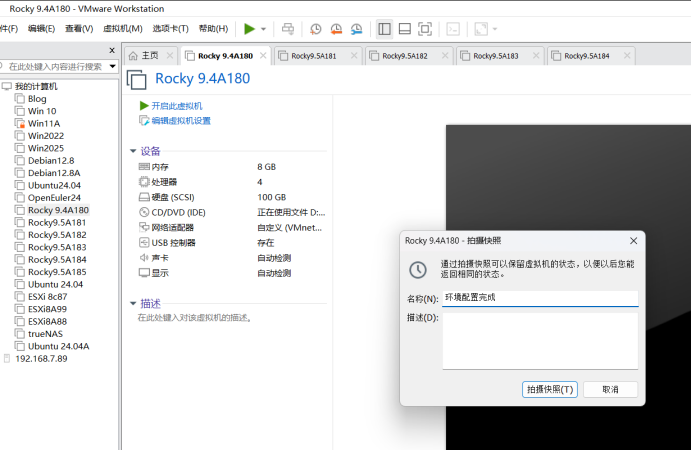
十七、Master1-3,node1、2拍摄快照
快照名称:环境配置完成
十八、创建k8s阿里云下的数据源
[root@1-5~]# cat >  /etc/yum.repos.d/kubernetes.repo <<EOF		创建k8s阿里云下的数据源
[kubernetes]
name=Kubernetes
baseurl=https://mirrors.aliyun.com/kubernetes-new/core/stable/v1.30/rpm/
enabled=1
gpgcheck=1
gpgkey=https://mirrors.aliyun.com/kubernetes-new/core/stable/v1.30/rpm/repodata/repomd.xml.key
EOF
十九、清空DNF缓存、重新生成DNF缓存
[root@1-5 ~]# dnf clean all		清空DNF缓存
32 个文件已删除
[root@1-5 ~]# dnf makecache	重新生成DNF缓存0
Docker CE Stable - x86_64
二十、安装k8s
[root@1-5 ~]# dnf -y install kubelet-1.30.0 kubeadm-1.30.0 kubectl-1.30.0 安装k8skubelet的作用:用于启动pod(容器的集合),只要pod启动就需要kubelet的命令
kubeadm的作用:用来初始化k8s集群,
kubectl的作用:用来部署和管理应用,查看各种资源,创建和删除,更新各种组件
二十一、master1上编辑初始化k8s集群
[root@master1 ~]# kubeadm config print init-defaults > kubeadm.yaml
[root@master1 ~]# ls
anaconda-ks.cfg  kubeadm.yaml
[root@master1 ~]# vim kubeadm.yaml		vim kubeadm.yaml(只在master上操作,其他机器上不操作)
12   advertiseAddress: 192.168.7.180		控制节点IP:7.180
 15   criSocket: unix:///run/containerd/containerd.sock	指定容器运行时具体命令的位置
17   name: master1				主节点的计算机名
30 imageRepository: registry.cn-hangzhou.aliyuncs.com/google_containers	阿里云的镜像仓库地址
35   podSubnet: 10.244.0.0/16				增加的pod网段
---
apiVersion: kubeproxy.config.k8s.io/v1alpha1
kind: KubeProxyConfiguration
mode: ipvs
---
apiVersion: kubelet.config.k8s.io/v1beta1
kind: KubeletConfiguration
cgroupDriver: systemd
二十二、基于kubeadm.yaml初始化k8s集群
[root@master1 ~]# kubeadm init --config=kubeadm.yaml --ignore-preflight-errors=SystemVerification 基于kubeadm.yaml初始化k8s集群二十三、把node1\node2加入到主节点中
复制节点信息,到node1\node2去粘贴:
  mkdir -p $HOME/.kube
  sudo cp -i /etc/kubernetes/admin.conf $HOME/.kube/config
  sudo chown $(id -u):$(id -g) $HOME/.kube/config
kubeadm join 192.168.7.180:6443 --token abcdef.0123456789abcdef \
--discovery-token-ca-cert-hash sha256:8eb2a953ff33124bfc7c02ab882b455979ea7728a38fdbda72a13abd030835d3[root@master1 ~]# mkdir -p $HOME/.kube 创建kube家目录下的隐藏文件
[root@master1 ~]# sudo cp -i /etc/kubernetes/admin.conf $HOME/.kube/config 将k8s的管理配置文件复制到隐藏目录的文件下
[root@master1 ~]# sudo chown $(id -u):$(id -g) $HOME/.kube/config 修改设置隐藏目录下文件的用户和组
[root@master1 ~]#[root@master1 ~]# kubectl get nodes
NAME STATUS ROLES AGE VERSION
master1 NotReady control-plane 2m10s v1.30.0
[root@master1 ~]#[root@node1 ~]#kubeadm join 192.168.7.180:6443 --token abcdef.0123456789abcdef \
--discovery-token-ca-cert-hash sha256:8eb2a953ff33124bfc7c02ab882b455979ea7728a38fdbda72a13abd030835d3
将node1节点加入到集群中[root@node2 ~]#kubeadm join 192.168.7.180:6443 --token abcdef.0123456789abcdef \
--discovery-token-ca-cert-hash sha256:8eb2a953ff33124bfc7c02ab882b455979ea7728a38fdbda72a13abd030835d3
将node2节点加入到集群中二十四、查看节点信息
[root@master1 ~]# kubectl get nodes		查看节点信息
NAME      STATUS     ROLES           AGE     VERSION
master1   NotReady没有准备 trol-plane控制节点 87s运行87秒 v.1.30.0版本
node1     NotReady   <none>          10s     v1.30.0
node2     NotReady   <none>          5s      v1.30.0
[root@master1 ~]#
二十五、给node1\node2打工作节点标签
[root@master1 ~]# kubectl label nodes node1 node-role.kubernetes.io/work=work	 将node1节点打工作节点标签
node/node1 labeled
[root@master1 ~]# kubectl label nodes node2 node-role.kubernetes.io/work=work	 将node2节点打工作节点标签
node/node2 labeled
[root@master1 ~]#
[root@master1 ~]#
[root@master1 ~]# kubectl get nodes		查看节点信息
NAME      STATUS     ROLES           AGE     VERSION
master1   NotReady   control-plane   15m     v1.30.0
node1     NotReady   work            9m47s   v1.30.0	    角色是work
node2     NotReady   work            9m42s   v1.30.0 角色是work,  为什么是NotReady,没有安装网络插件
[root@master1 ~]#
二十六、三个节点上传网络插件:
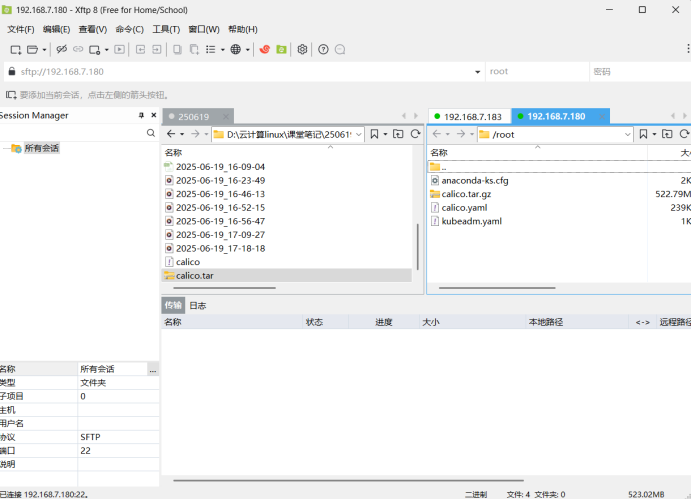
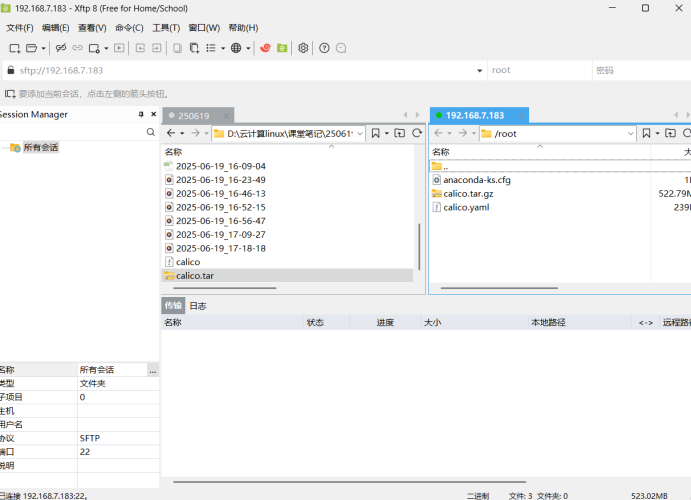
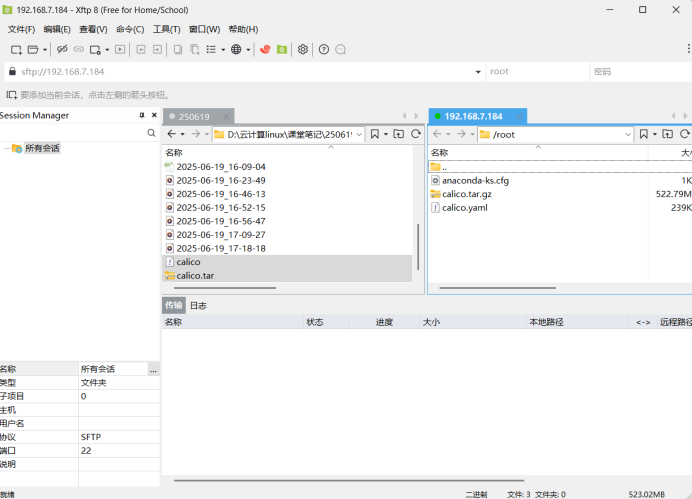
二十六、master1、node1、node2节点导入calico的网络组件
[root@master1 ~]# ls
anaconda-ks.cfg  calico.tar.gz  calico.yaml  kubeadm.yaml
[root@master1 ~]# ctr -n k8s.io images import calico.tar.gz 所有节点导入calico的网络组件
unpacking docker.io/calico/cni:v3.26.1 (sha256:dbdd8749b4d394abf14b528fbc5a41d654953c7e4d08f1a2133e9300affe0e98)...done
unpacking docker.io/calico/node:v3.26.1 (sha256:86644b66a7ba300e287656ad141e509c5ffd1a282648d80a01d29c46c6c4870c)...done
unpacking docker.io/calico/kube-controllers:v3.26.1 (sha256:0157cc18893d4ebbfbb6ec451cc022bfcc832f3c872f9fcd5534bb45586ac307)...done
unpacking docker.io/calico/pod2daemon-flexvol:v3.26.1 (sha256:b21921f913c9e438ab58e06f9fbc4c8ee148278fe785d2324fb0b15ff65c74d2)...done
[root@master1 ~]# ctr -n k8s.io images import calico.tar.gz
unpacking docker.io/calico/cni:v3.26.1 (sha256:dbdd8749b4d394abf14b528fbc5a41d654953c7e4d08f1a2133e9300affe0e98)...done
unpacking docker.io/calico/node:v3.26.1 (sha256:86644b66a7ba300e287656ad141e509c5ffd1a282648d80a01d29c46c6c4870c)...done
unpacking docker.io/calico/kube-controllers:v3.26.1 (sha256:0157cc18893d4ebbfbb6ec451cc022bfcc832f3c872f9fcd5534bb45586ac307)...done
unpacking docker.io/calico/pod2daemon-flexvol:v3.26.1 (sha256:b21921f913c9e438ab58e06f9fbc4c8ee148278fe785d2324fb0b15ff65c74d2)...done
[root@master1 ~]#
[root@node1 ~]# ctr -n k8s.io images import calico.tar.gz
unpacking docker.io/calico/cni:v3.26.1 (sha256:dbdd8749b4d394abf14b528fbc5a41d654953c7e4d08f1a2133e9300affe0e98)...done
unpacking docker.io/calico/node:v3.26.1 (sha256:86644b66a7ba300e287656ad141e509c5ffd1a282648d80a01d29c46c6c4870c)...done
unpacking docker.io/calico/kube-controllers:v3.26.1 (sha256:0157cc18893d4ebbfbb6ec451cc022bfcc832f3c872f9fcd5534bb45586ac307)...done
unpacking docker.io/calico/pod2daemon-flexvol:v3.26.1 (sha256:b21921f913c9e438ab58e06f9fbc4c8ee148278fe785d2324fb0b15ff65c74d2)...done
[root@node1 ~]# ctr -n k8s.io images import calico.tar.gz
unpacking docker.io/calico/cni:v3.26.1 (sha256:dbdd8749b4d394abf14b528fbc5a41d654953c7e4d08f1a2133e9300affe0e98)...done
unpacking docker.io/calico/node:v3.26.1 (sha256:86644b66a7ba300e287656ad141e509c5ffd1a282648d80a01d29c46c6c4870c)...done
unpacking docker.io/calico/kube-controllers:v3.26.1 (sha256:0157cc18893d4ebbfbb6ec451cc022bfcc832f3c872f9fcd5534bb45586ac307)...done
unpacking docker.io/calico/pod2daemon-flexvol:v3.26.1 (sha256:b21921f913c9e438ab58e06f9fbc4c8ee148278fe785d2324fb0b15ff65c74d2)...done
[root@node1 ~]# [root@node2 ~]# ls
anaconda-ks.cfg calico.tar.gz calico.yaml
[root@node2 ~]# ctr -n k8s.io images import calico.tar.gz
unpacking docker.io/calico/cni:v3.26.1 (sha256:dbdd8749b4d394abf14b528fbc5a41d654953c7e4d08f1a2133e9300affe0e98)...done
unpacking docker.io/calico/node:v3.26.1 (sha256:86644b66a7ba300e287656ad141e509c5ffd1a282648d80a01d29c46c6c4870c)...done
unpacking docker.io/calico/kube-controllers:v3.26.1 (sha256:0157cc18893d4ebbfbb6ec451cc022bfcc832f3c872f9fcd5534bb45586ac307)...done
unpacking docker.io/calico/pod2daemon-flexvol:v3.26.1 (sha256:b21921f913c9e438ab58e06f9fbc4c8ee148278fe785d2324fb0b15ff65c74d2)...done
[root@node2 ~]# ctr -n k8s.io images import calico.tar.gz
unpacking docker.io/calico/cni:v3.26.1 (sha256:dbdd8749b4d394abf14b528fbc5a41d654953c7e4d08f1a2133e9300affe0e98)...done
unpacking docker.io/calico/node:v3.26.1 (sha256:86644b66a7ba300e287656ad141e509c5ffd1a282648d80a01d29c46c6c4870c)...done
unpacking docker.io/calico/kube-controllers:v3.26.1 (sha256:0157cc18893d4ebbfbb6ec451cc022bfcc832f3c872f9fcd5534bb45586ac307)...done
unpacking docker.io/calico/pod2daemon-flexvol:v3.26.1 (sha256:b21921f913c9e438ab58e06f9fbc4c8ee148278fe785d2324fb0b15ff65c74d2)...done
[root@node2 ~]# 二十七、master1编辑calico的配置文件及应用calico配置文件
[root@master1 ~]# vim calico.yaml 		编辑calico的配置文件
4768               value: "interface=ens160"	修改网卡接口名称:ens160
[root@master1 ~]# kubectl apply -f calico.yaml  应用calico配置文件
poddisruptionbudget.policy/calico-kube-controllers created
serviceaccount/calico-kube-controllers created
[root@master1 ~]# systemctl enable kubelet	设置kubelet开机启动
[root@master1 ~]# systemctl start kubelet		启动kubelet
二十八、node1、node2设置kubelet开机启动、启动kubelet
[root@node1 ~]#  systemctl enable kubelet		设置kubelet开机启动
Created symlink /etc/systemd/system/multi-user.target.wants/kubelet.service → /usr/lib/systemd/system/kubelet.service.
[root@node1 ~]# systemctl start kubelet		启动kubelet
[root@node1 ~]#
[root@node2 ~]# systemctl enable kubelet 设置kubelet开机启动
Created symlink /etc/systemd/system/multi-user.target.wants/kubelet.service → /usr/lib/systemd/system/kubelet.service.
[root@node2 ~]# systemctl start kubelet 启动kubelet
[root@node2 ~]#二十九、master1查看节点
[root@master1 ~]# kubectl get nodes		查看节点
NAME      STATUS   ROLES           AGE   VERSION
master1   Ready    control-plane   20h   v1.30.0
node1     Ready    work            20h   v1.30.0
node2     Ready    work            20h   v1.30.0
[root@master1 ~]#
三十、node1、node2导入k8s.io的镜像
[root@node1 ~]# ls
anaconda-ks.cfg  busybox-1-28.tar.gz  calico.tar.gz  calico.yaml
[root@node1 ~]# ctr -n k8s.io images import busybox-1-28.tar.gz  导入k8s.io的镜像,主要为了测试用
unpacking docker.io/library/busybox:1.28 (sha256:585093da3a716161ec2b2595011051a90d2f089bc2a25b4a34a18e2cf542527c)...done
[root@node1 ~]#
[root@node2 ~]# ls
anaconda-ks.cfg busybox-1-28.tar.gz calico.tar.gz calico.yaml
[root@node2 ~]# ctr -n k8s.io images import busybox-1-28.tar.gz 导入k8s.io的镜像,主要为了测试用
unpacking docker.io/library/busybox:1.28 (sha256:585093da3a716161ec2b2595011051a90d2f089bc2a25b4a34a18e2cf542527c)...done
[root@node2 ~]#三十一、k8s运行busybox镜像,并生成busybox容器,并进入busybox容器
[root@master1 ~]# kubectl run busybox --image docker.io/library/busybox:1.28  --image-pull-policy=IfNotPresent --restart=Never --rm -it busybox -- sh
k8s运行busybox镜像,并生成busybox容器,并进入busybox容器
If you don't see a command prompt, try pressing enter.
/ #
/ # ping www.baidu.com  保证容器能上网
PING www.baidu.com (110.242.70.57): 56 data bytes
64 bytes from 110.242.70.57: seq=0 ttl=127 time=42.868 ms
64 bytes from 110.242.70.57: seq=1 ttl=127 time=39.068 ms
64 bytes from 110.242.70.57: seq=2 ttl=127 time=43.879 ms
^C
--- www.baidu.com ping statistics ---
3 packets transmitted, 3 packets received, 0% packet loss
round-trip min/avg/max = 39.068/41.938/43.879 ms
/ # ping 110.242.70.57  ping百度的IP
PING 110.242.70.57 (110.242.70.57): 56 data bytes
64 bytes from 110.242.70.57: seq=0 ttl=127 time=19.811 ms
64 bytes from 110.242.70.57: seq=1 ttl=127 time=22.854 ms
64 bytes from 110.242.70.57: seq=2 ttl=127 time=32.756 ms
--- 110.242.70.57 ping statistics ---
7 packets transmitted, 7 packets received, 0% packet loss
round-trip min/avg/max = 19.811/31.522/57.363 ms
/ # nslookup kubernetes.default.svc.cluster.local 解析本地的计算机域名
Server: 10.96.0.10
Address 1: 10.96.0.10 kube-dns.kube-system.svc.cluster.local
Name: kubernetes.default.svc.cluster.local
Address 1: 10.96.0.1 kubernetes.default.svc.cluster.local
/ # exit
pod "busybox" deleted
[root@master1 ~]#三十二、master1、node1、node2关机做快照, 快照名称:单节点集群配置完成
[root@master1 ~]# shutdown -h now
[root@node1 ~]# shutdown -h now
[root@node2 ~]# shutdown -h now