[root@zabbix ~]# mysql(进入数据库)
Welcome to the MariaDB monitor.  Commands end with ; or \g.
Your MariaDB connection id is 11
Server version: 10.5.27-MariaDB MariaDB Server

Copyright (c) 2000, 2018, Oracle, MariaDB Corporation Ab and others.

Type 'help;' or '\h' for help. Type '\c' to clear the current input statement.

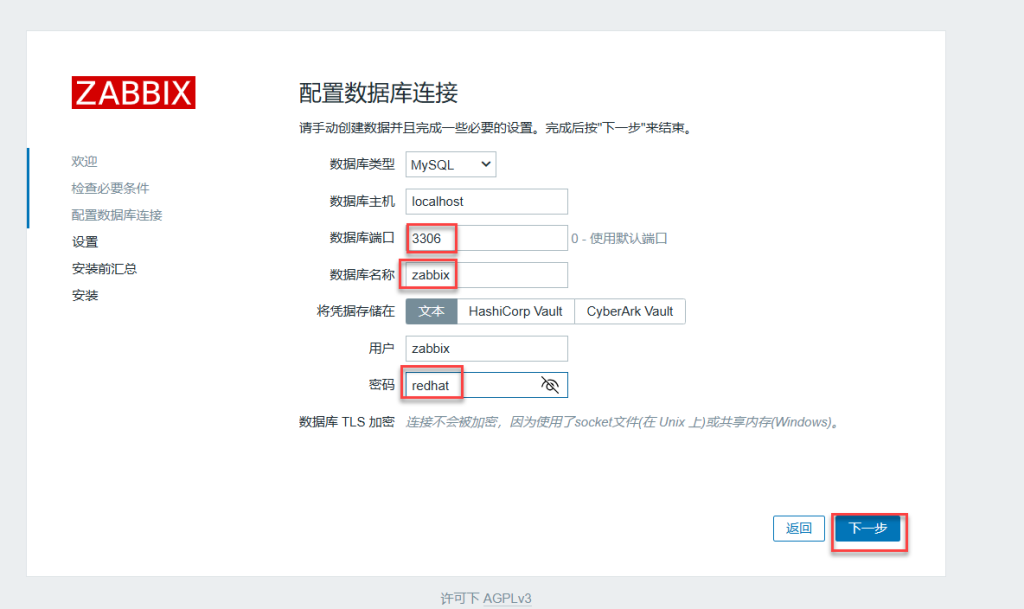
MariaDB [(none)]> create database zabbix character set utf8mb4 collate utf8mb4_bin;(创建一个使用uft8mb4字符集和uft8mb4_bin排序规则的zabbix数据库)
Query OK, 1 row affected (0.000 sec)

MariaDB [(none)]> create user zabbix@localhost identified by 'redhat';(创建用户为zabbix,只允许本地登录,认证密码是“redhat”)
Query OK, 0 rows affected (0.001 sec)

MariaDB [(none)]> grant all privileges on zabbix.* to zabbix@localhost;(将数据库全授权给zabbix用户只允许本地登录)
Query OK, 0 rows affected (0.001 sec)

MariaDB [(none)]> set global log_bin_trust_function_creators = 1;(放宽mysql对存储函数和触发器创建的安全限制,允许在启用二进制日志的情况下,创建和修改未明确指定安全特性的函数)
Query OK, 0 rows affected (0.000 sec)

MariaDB [(none)]> flush privileges;(刷新授权)
Query OK, 0 rows affected (0.000 sec)

MariaDB [(none)]> exit(退出)
十一、zabbix数据库设置默认字符集
[root@zabbix ~]# zcat /usr/share/zabbix-sql-scripts/mysql/server.sql.gz | mysql --default-character-set=utf8mb4 -uzabbix -p zabbix(将zabbix数据库文件导入zabbix数据库中设置默认字符集utfmb4)
Enter password: redhat
十二、进入数据库进行配置
[root@zabbix ~]# mysql(登录数据库)
Welcome to the MariaDB monitor.  Commands end with ; or \g.
Your MariaDB connection id is 13
Server version: 10.5.27-MariaDB MariaDB Server

Copyright (c) 2000, 2018, Oracle, MariaDB Corporation Ab and others.

Type 'help;' or '\h' for help. Type '\c' to clear the current input statement.

MariaDB [(none)]> set global log_bin_trust_function_creators = 0;(0是mysql基线配置适用于需要严格保障主从数据一致性的保存环境)
Query OK, 0 rows affected (0.000 sec)

MariaDB [(none)]> quit(退出)
十三、编辑zabbix数据库配置文件
[root@zabbix ~]# vim /etc/zabbix/zabbix_server.conf (编辑zabbix数据库配置文件)
132 DBPassword=redhat(zabbix数据库密码为redhat)
十四、编辑阿帕奇的配置文件
[root@zabbix ~]# vim /etc/httpd/conf/httpd.conf (编辑阿帕奇的配置文件)
47 Listen 8080(监听端口8080)