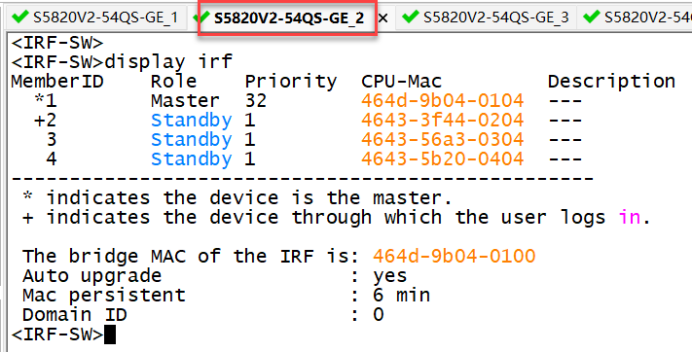
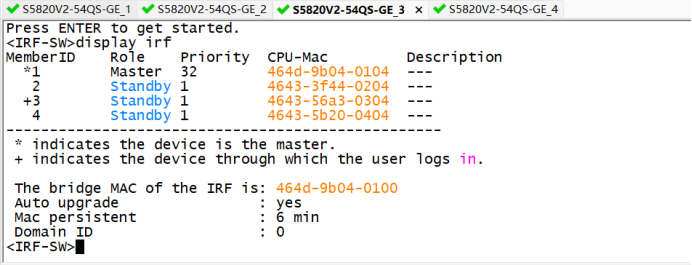
一、实验拓扑图
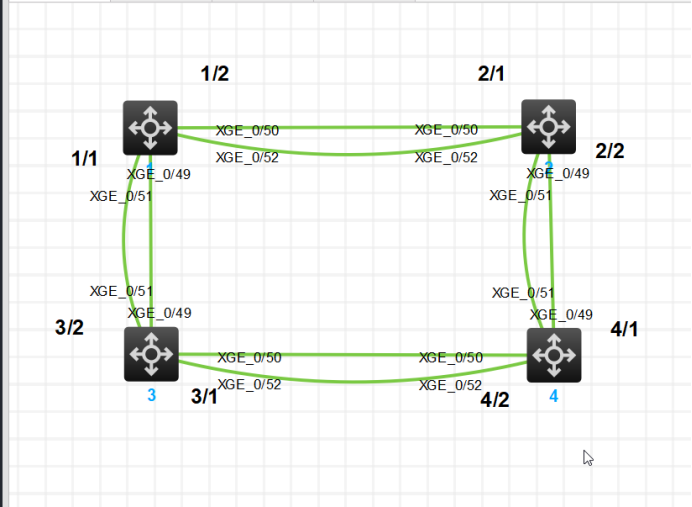
二、配置第一台交换机
<H3C>system-view
System View: return to User View with Ctrl+Z.
[H3C]undo info-center enable
Information center is disabled.
[H3C]irf member 1 priority Ten
[H3C]irf member 1 priority 32
[H3C]interface range Ten
[H3C]interface range Ten-GigabitEthernet 1/0/49 to Ten
[H3C]interface range Ten-GigabitEthernet 1/0/49 to Ten-GigabitEthernet 1/0/52
[H3C-if-range]shutdown
[H3C-if-range]quit
[H3C]irf-port 1/1
[H3C-irf-port1/1]port group interface Ten
[H3C-irf-port1/1]port group interface Ten-GigabitEthernet 1/0/49
You must perform the following tasks for a successful IRF setup:
Save the configuration after completing IRF configuration.
Execute the "irf-port-configuration active" command to activate the IRF ports.
[H3C-irf-port1/1]port group interface Ten-GigabitEthernet 1/0/51
[H3C-irf-port1/1]quit
[H3C]interface range Ten-GigabitEthernet 1/0/49 to Ten-GigabitEthernet 1/0/52
[H3C-if-range]undo shutdown
[H3C-if-range]quit
[H3C]save force
Validating file. Please wait...
三、配置第二台交换机
<H3C>system-view
System View: return to User View with Ctrl+Z.
[H3C]undo info-center enable
Information center is disabled.
[H3C]irf member 1 renumber 2
Renumbering the member ID may result in configuration change or loss. Continue?[Y/N]:y
[H3C]quit
<H3C>reboot
Start to check configuration with next startup configuration file, please wait.........DONE!
Current configuration may be lost after the reboot, save current configuration? [Y/N]:y
Please input the file name(*.cfg)[flash:/startup.cfg]
(To leave the existing filename unchanged, press the enter key):
Validating file. Please wait...
Saved the current configuration to mainboard device successfully.
This command will reboot the device. Continue? [Y/N]:y
Now rebooting, please wait...
<H3C>system-view
System View: return to User View with Ctrl+Z.
[H3C]interface range Ten
[H3C]interface range Ten-GigabitEthernet 2/0/49 to Ten
[H3C]interface range Ten-GigabitEthernet 2/0/49 to Ten-GigabitEthernet 2/0/52
[H3C-if-range]shutdown
[H3C-if-range]quit
[H3C]irf-port 2/1
[H3C-irf-port2/1]port group interface Ten
[H3C-irf-port2/1]port group interface Ten-GigabitEthernet 2/0/50
You must perform the following tasks for a successful IRF setup:
Save the configuration after completing IRF configuration.
Execute the "irf-port-configuration active" command to activate the IRF ports.
[H3C-irf-port2/1]port group interface Ten-GigabitEthernet 2/0/52
[H3C-irf-port2/1]quit
[H3C]irf-port 2/2
[H3C-irf-port2/2]port group interface Ten
[H3C-irf-port2/2]port group interface Ten-GigabitEthernet 2/0/49
You must perform the following tasks for a successful IRF setup:
Save the configuration after completing IRF configuration.
Execute the "irf-port-configuration active" command to activate the IRF ports.
[H3C-irf-port2/2]port group interface Ten-GigabitEthernet 2/0/51
[H3C-irf-port2/2]quit
[H3C]interface range Ten-GigabitEthernet 2/0/49 to Ten-GigabitEthernet 2/0/52
[H3C-if-range]undo shutdown
[H3C-if-range]quit
[H3C]save force
Validating file. Please wait...
Saved the current configuration to mainboard device successfully.
[H3C]irf-port-configuration active
[H3C]四、配置第一台交换机
[H3C]interface range Ten-GigabitEthernet 1/0/49 to Ten-GigabitEthernet 1/0/52
[H3C-if-range]shutdown
[H3C-if-range]quit
[H3C]irf-port 1/2
[H3C-irf-port1/2]port group interface Ten-GigabitEthernet 1/0/50
You must perform the following tasks for a successful IRF setup:
Save the configuration after completing IRF configuration.
Execute the "irf-port-configuration active" command to activate the IRF ports.
[H3C-irf-port1/2]port group interface Ten-GigabitEthernet 1/0/52
[H3C-irf-port1/2]quit
[H3C]interface range Ten-GigabitEthernet 1/0/49 to Ten-GigabitEthernet 1/0/52
[H3C-if-range]undo shutdown
[H3C-if-range]quit
[H3C]save force
Validating file. Please wait...
Saved the current configuration to mainboard device successfully.
[H3C]irf-port-configuration active
五、配置第三台交换机
<H3C>system-view
System View: return to User View with Ctrl+Z.
[H3C]undo info-center enable
Information center is disabled.
[H3C]irf member 1 renumber 3
Renumbering the member ID may result in configuration change or loss. Continue?[Y/N]:y
[H3C]quit
<H3C>reboot
Start to check configuration with next startup configuration file, please wait.........DONE!
Current configuration may be lost after the reboot, save current configuration? [Y/N]:y
Please input the file name(*.cfg)[flash:/startup.cfg]
(To leave the existing filename unchanged, press the enter key):
Validating file. Please wait...
Saved the current configuration to mainboard device successfully.
This command will reboot the device. Continue? [Y/N]:y
Now rebooting, please wait...
六、配置第4台交换机
<H3C>system-view
System View: return to User View with Ctrl+Z.
[H3C]undo info-center enable
Information center is disabled.
[H3C]irf member 1 renumber 4
Renumbering the member ID may result in configuration change or loss. Continue?[Y/N]:y
[H3C]quit
<H3C>reboot
Start to check configuration with next startup configuration file, please wait.........DONE!
Current configuration may be lost after the reboot, save current configuration? [Y/N]:y
Please input the file name(*.cfg)[flash:/startup.cfg]
(To leave the existing filename unchanged, press the enter key):
Validating file. Please wait...
Saved the current configuration to mainboard device successfully.
This command will reboot the device. Continue? [Y/N]:y
Now rebooting, please wait...
七、配置第三台虚拟机
<H3C>system-view
System View: return to User View with Ctrl+Z.
[H3C]undo info-center enable
Information center is disabled.
[H3C]interface range ten
[H3C]interface range Ten-GigabitEthernet 3/0/49 to
[H3C]interface range Ten-GigabitEthernet 3/0/49 to t
[H3C]interface range Ten-GigabitEthernet 3/0/49 to Ten-GigabitEthernet 3/0/52
[H3C-if-range]shutdown
[H3C-if-range]quit
[H3C]irf-port 3/2
[H3C-irf-port3/2]port group t
[H3C-irf-port3/2]port group interface ten
[H3C-irf-port3/2]port group interface Ten-GigabitEthernet 3/0/49
You must perform the following tasks for a successful IRF setup:
Save the configuration after completing IRF configuration.
Execute the "irf-port-configuration active" command to activate the IRF ports.
[H3C-irf-port3/2]port group interface Ten-GigabitEthernet 3/0/51
[H3C-irf-port3/2]quit
[H3C]irf-port 3/1
[H3C-irf-port3/1]port group interface tne
[H3C-irf-port3/1]port group interface ten
[H3C-irf-port3/1]port group interface Ten-GigabitEthernet 3/0/50
You must perform the following tasks for a successful IRF setup:
Save the configuration after completing IRF configuration.
Execute the "irf-port-configuration active" command to activate the IRF ports.
[H3C-irf-port3/1]port group interface Ten-GigabitEthernet 3/0/52
[H3C-irf-port3/1]quit
[H3C]interface range Ten-GigabitEthernet 3/0/49 to Ten-GigabitEthernet 3/0/52
[H3C-if-range]undo shutdown
[H3C-if-range]quit
[H3C]save force
Validating file. Please wait...
Saved the current configuration to mainboard device successfully.
[H3C]irf-port-configuration active
[H3C]
八、配置第四台交换机
<H3C>system-view
System View: return to User View with Ctrl+Z.
[H3C]undo info-center enable
Information center is disabled.
[H3C]interface range ten
[H3C]interface range Ten-GigabitEthernet 4/0/49 to ten
[H3C]interface range Ten-GigabitEthernet 4/0/49 to Ten-GigabitEthernet 4/0/52
[H3C-if-range]shutdown
[H3C-if-range]quit
[H3C]irf-port 4/1
[H3C-irf-port4/1]port group interface ten
[H3C-irf-port4/1]port group interface Ten-GigabitEthernet 4/0/49
You must perform the following tasks for a successful IRF setup:
Save the configuration after completing IRF configuration.
Execute the "irf-port-configuration active" command to activate the IRF ports.
[H3C-irf-port4/1]port group interface Ten-GigabitEthernet 4/0/51
[H3C-irf-port4/1]quit
[H3C]irf-port 4/2
[H3C-irf-port4/2]port group interface Ten-GigabitEthernet 4/0/50
You must perform the following tasks for a successful IRF setup:
Save the configuration after completing IRF configuration.
Execute the "irf-port-configuration active" command to activate the IRF ports.
[H3C-irf-port4/2]port group interface Ten-GigabitEthernet 4/0/52
[H3C-irf-port4/2]quit
[H3C]interface range Ten-GigabitEthernet 4/0/49 to Ten-GigabitEthernet 4/0/52
[H3C-if-range]undo shutdown
[H3C-if-range]quit
[H3C]save force
Validating file. Please wait...
Saved the current configuration to mainboard device successfully.
[H3C]irf-port-configuration active
[H3C]Cryptographic Algorithms Known-Answer Tests are running ...
九、第一台交换机上创建vlan
<H3C>system-view
System View: return to User View with Ctrl+Z.
[H3C]vlan 10
[H3C-vlan10]vlan 20
[H3C-vlan20]vlan 30
[H3C-vlan30]vlan 40
[H3C-vlan40]sysname IRF-SW
[IRF-SW]
十、验证