h3下 RIP协议

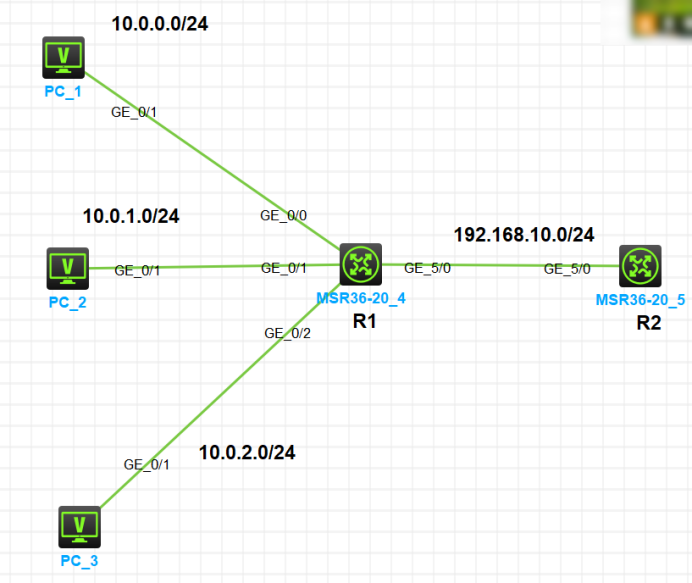
一、实验拓扑图

二、配置R1路由器

<H3C>system-view
System View: return to User View with Ctrl+Z.
[H3C]sysname R1
[R1]interface g 0/0
[R1-GigabitEthernet0/0]ip address 10.0.0.1 24
[R1-GigabitEthernet0/0]undo shutdown
[R1-GigabitEthernet0/0]quit
[R1]interface g 0/1
[R1-GigabitEthernet0/1]ip address 10.0.1.1 24
[R1-GigabitEthernet0/1]undo shutdown
[R1-GigabitEthernet0/1]quit
[R1]interface g 0/2
[R1-GigabitEthernet0/2]ip address 10.0.2.1 24
[R1-GigabitEthernet0/2]undo shutdown
[R1-GigabitEthernet0/2]quit
[R1]interface g 5/0
[R1-GigabitEthernet5/0]ip address 10.0.10.1 24
[R1-GigabitEthernet5/0]undo shutdown
[R1-GigabitEthernet5/0]
[R1-GigabitEthernet5/0]quit

三、配置R2路由器

<H3C>system-view
System View: return to User View with Ctrl+Z.
[H3C]undo info-center enable
Information center is disabled.
[H3C]interface g 5/0
[H3C-GigabitEthernet5/0]ip address 192.168.10.2 24
[H3C-GigabitEthernet5/0]undo shutdown
[H3C-GigabitEthernet5/0]quit
[H3C]
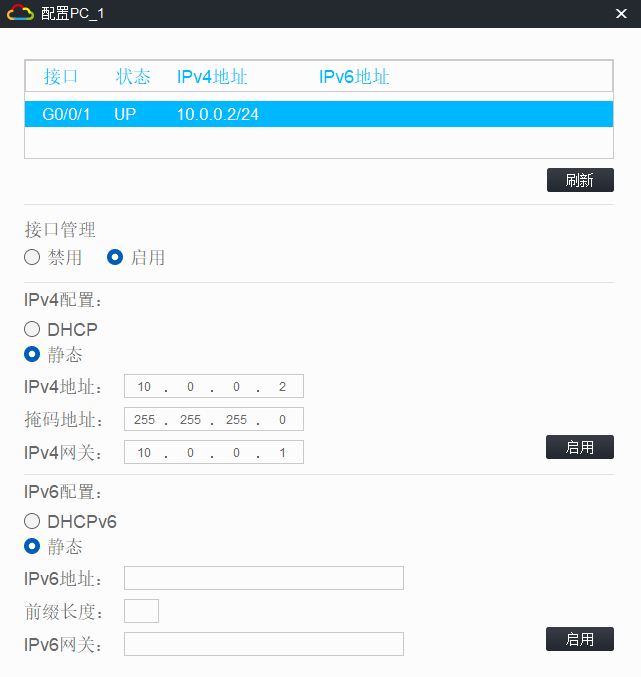
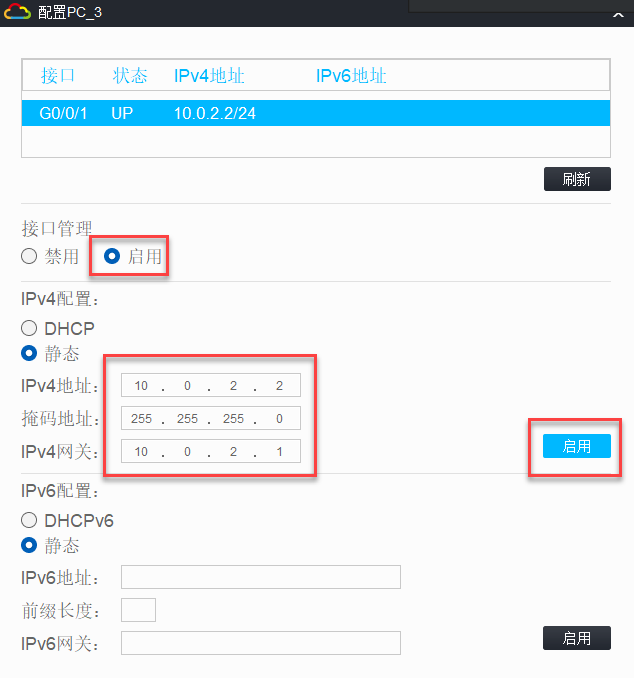
四、设置PC IP:

五、R1设置RIP协议:

[R1]rip 1  使用RIp进程号是1
[R1-rip-1]network 10.0.0.0
[R1-rip-1]network 10.0.1.0
[R1-rip-1]network 10.0.2.0
[R1-rip-1]network 192.168.10.0 宣告的网段是192.168.10.0
[R1-rip-1]quit

六、R2设置RIP协议

[R2]rip 1 使用RIp进程号是1
[R2-rip-1]network 192.168.10.0 宣告的网段是192.168.10.0
[R2-rip-1]quit

七、查看IP信息表

[R2]display ip routing-table

Destinations : 11       Routes : 11

Destination/Mask   Proto   Pre Cost        NextHop         Interface
0.0.0.0/32         Direct  0   0           127.0.0.1       InLoop0
10.0.0.0/8         RIP     100 1           192.168.10.1    GE5/0
127.0.0.0/8        Direct  0   0           127.0.0.1       InLoop0
127.0.0.1/32       Direct  0   0           127.0.0.1       InLoop0
127.255.255.255/32 Direct  0   0           127.0.0.1       InLoop0
192.168.10.0/24    Direct  0   0           192.168.10.2    GE5/0
192.168.10.2/32    Direct  0   0           127.0.0.1       InLoop0
192.168.10.255/32  Direct  0   0           192.168.10.2    GE5/0
224.0.0.0/4        Direct  0   0           0.0.0.0         NULL0
224.0.0.0/24       Direct  0   0           0.0.0.0         NULL0
255.255.255.255/32 Direct  0   0           127.0.0.1       InLoop0

八、设置RIP1和RIP2版本、关闭自动汇总

[R1]rip 1 使用RIp进程号是1
[R1-rip-1]version 2
[R1-rip-1]undo summary
[R1-rip-1]quit
[R2]rip 使用RIP协议 进程号是1可以省略
[R2-rip-1]version 2 版本
[R2-rip-1]undo summary 关闭自动汇总
[R2-rip-1]quit

九、查看IP路由信息表

[R2]display ip routing-table

Destinations : 14       Routes : 14

Destination/Mask   Proto   Pre Cost        NextHop         Interface
0.0.0.0/32         Direct  0   0           127.0.0.1       InLoop0
10.0.0.0/8         RIP     100 1           192.168.10.1    GE5/0
10.0.0.0/24        RIP     100 1           192.168.10.1    GE5/0
10.0.1.0/24        RIP     100 1           192.168.10.1    GE5/0
10.0.2.0/24        RIP     100 1           192.168.10.1    GE5/0
127.0.0.0/8        Direct  0   0           127.0.0.1       InLoop0
127.0.0.1/32       Direct  0   0           127.0.0.1       InLoop0
127.255.255.255/32 Direct  0   0           127.0.0.1       InLoop0
192.168.10.0/24    Direct  0   0           192.168.10.2    GE5/0
192.168.10.2/32    Direct  0   0           127.0.0.1       InLoop0
192.168.10.255/32  Direct  0   0           192.168.10.2    GE5/0
224.0.0.0/4        Direct  0   0           0.0.0.0         NULL0
224.0.0.0/24       Direct  0   0           0.0.0.0         NULL0
255.255.255.255/32 Direct  0   0           127.0.0.1       InLoop0
[R2]

十、rip汇总地址 10.0.0.0

[R1]interface g 5/0
[R1-GigabitEthernet5/0]rip summary-address 10.0.0.0 22 rip汇总地址 10.0.0.0 子网掩码22(RIP的手动汇总)
[R1-GigabitEthernet5/0]quit

十一、R2下查看路由信息表

[R2]display ip routing-table	查看IP路由表信息(需要等一会儿)

Destinations : 14       Routes : 14

Destination/Mask   Proto   Pre Cost        NextHop         Interface
0.0.0.0/32         Direct  0   0           127.0.0.1       InLoop0
10.0.0.0/22        RIP     100 1           192.168.10.1    GE5/0		手动汇总信息 子网掩码22

暂无评论

发送评论 编辑评论


|´・ω・)ノ
ヾ(≧∇≦*)ゝ
(☆ω☆)
(╯‵□′)╯︵┴─┴
 ̄﹃ ̄
(/ω\)
∠( ᐛ 」∠)_
(๑•̀ㅁ•́ฅ)
→_→
୧(๑•̀⌄•́๑)૭
٩(ˊᗜˋ*)و
(ノ°ο°)ノ
(´இ皿இ`)
⌇●﹏●⌇
(ฅ´ω`ฅ)
(╯°A°)╯︵○○○
φ( ̄∇ ̄o)
ヾ(´・ ・`。)ノ"
( ง ᵒ̌皿ᵒ̌)ง⁼³₌₃
(ó﹏ò。)
Σ(っ °Д °;)っ
( ,,´・ω・)ノ"(´っω・`。)
╮(╯▽╰)╭
o(*////▽////*)q
>﹏<
( ๑´•ω•) "(ㆆᴗㆆ)
😂
😀
😅
😊
🙂
🙃
😌
😍
😘
😜
😝
😏
😒
🙄
😳
😡
😔
😫
😱
😭
💩
👻
🙌
🖕
👍
👫
👬
👭
🌚
🌝
🙈
💊
😶
🙏
🍦
🍉
😣
Source: github.com/k4yt3x/flowerhd
颜文字
Emoji
小恐龙
花!
上一篇
下一篇