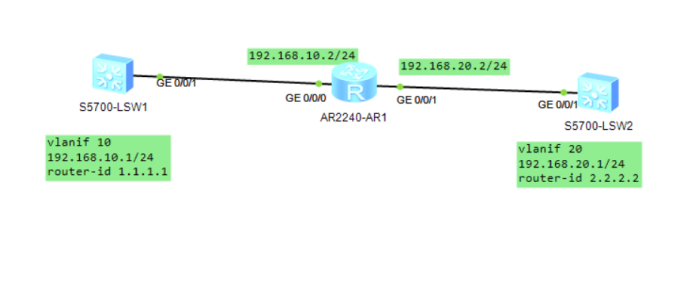
<Huawei>system-view 进入视图模式
Enter system view, return user view with Ctrl+Z.
[Huawei]undo info-center enable 关闭消息控制台
Info: Information center is disabled.
[Huawei]sysname sw1 修改名称为:sw1
[3sw1]vlan batch 10 20 创建vlan10和20 创建vlan10和20
Info: This operation may take a few seconds. Please wait for a moment...done.
[3sw1]interface vlanif 10 进入vlan10的虚接口
[3sw1-Vlanif10]ip address 192.168.10.1 24  IP地址192.168.10.1,子网掩码24
[3sw1-Vlanif10]quit 退出
[3sw1-Vlanif10]interface g0/0/1 进入g0/0/1接口 进入g0/0/1接口  进入g0/0/1接口
[3sw1-GigabitEthernet0/0/1]port link-type access 端口链路类型为接入链路	端口链路类型为介入链路
[3sw1-GigabitEthernet0/0/1]port default vlan 10 端口接入vlan10 端口接入vlan10
[3sw1-GigabitEthernet0/0/1]quit 退出
<Huawei>system-view 进入视图模式
Enter system view, return user view with Ctrl+Z.
[Huawei]undo info-center enable 关闭消息控制台
Info: Information center is disabled.
[Huawei]sysname sw2 修改名称为:sw2
[3sw2]vlan batch 10 20 创建vlan10和20
Info: This operation may take a few seconds. Please wait for a moment...done.
[3sw2]interface vlanif 20 进入vlan20的虚接口
[3sw2-Vlanif20]ip address 192.168.20.1 24 ip地址192.168.20.1 子网掩码24
[3sw2-Vlanif20]quit 退出
[3sw2]interface g0/0/1 进入g0/0/1接口 进入g0/0/1接口
[3sw2-GigabitEthernet0/0/1]port link-type access 端口链路类型为接入链路 端口链路类型为接入链路
[3sw2-GigabitEthernet0/0/1]port default vlan 20 端口接入vlan20
[3sw2-GigabitEthernet0/0/1]quit 退出
三、设置R1路由器接口IP
<Huawei>system-view 进入视图模式
Enter system view, return user view with Ctrl+Z.
[Huawei]undo info-center enable 关闭消息控制台
Info: Information center is disabled.
[Huawei]sysname r1 更改名称为:r1
[r1]interface g0/0/0 进入g0/0/0接口
[r1-GigabitEthernet0/0/0]ip address 192.168.10.2 24	IP地址192.168.10.2 子网掩码24
[r1-GigabitEthernet0/0/0]undo shutdown 关闭消息控制台
Info: Interface GigabitEthernet0/0/0 is not shutdown.
[r1-GigabitEthernet0/0/0]quit 退出
[r1]interface g0/0/1 进入g0/0/1接口 进入g0/0/1接口
[r1-GigabitEthernet0/0/1]ip address 192.168.20.2 24 IP地址192.168.20.2 子网掩码24
[r1-GigabitEthernet0/0/1]undo shutdown 关闭消息控制台
Info: Interface GigabitEthernet0/0/1 is not shutdown.
[r1-GigabitEthernet0/0/1]quit 退出
<r1>system-view 进入视图模式
Enter system view, return user view with Ctrl+Z.
[r1]ospf 1 ospf进程号是1
[r1-ospf-1]area 0 宣告是骨干区域area0
[r1-ospf-1-area-0.0.0.0]network 192.168.10.0 0.0.0.255 宣告的网段192.168.10.0 反掩码:0.0.0.255
[r1-ospf-1-area-0.0.0.0]quit 退出
[r1-ospf-1]quit 退出
[r1]ospf 1
[r1-ospf-1]area 0 宣告是骨干区域area0
[r1-ospf-1-area-0.0.0.0]network 192.168.20.0 0.0.0.255 宣告的网段192.168.20.0 反掩码:0.0.0.255
[r1-ospf-1-area-0.0.0.0]quit 退出
[r1-ospf-1]quit 退出
六、查看路由表中OSPF路由表协议的信息
[r1]display ip routing-table protocol ospf 查看路由表中OSPF路由表协议的信息

Route Flags: R - relay, D - download to fib
------------------------------------------------------------------------------
Public routing table : OSPF
         Destinations : 1        Routes : 1

OSPF routing table status : <Active>
         Destinations : 1        Routes : 1

Destination/Mask    Proto   Pre  Cost      Flags NextHop         Interface

   192.168.20.0/24  OSPF    10   2           D   192.168.10.2    Vlanif10  看这个

OSPF routing table status : <Inactive>
         Destinations : 0        Routes : 0
七、测试 3SW1 ping 3SW2 是否通信:
[3sw1]ping 192.168.20.1
  PING 192.168.20.1: 56  data bytes, press CTRL_C to break
    Reply from 192.168.20.1: bytes=56 Sequence=1 ttl=254 time=60 ms
    Reply from 192.168.20.1: bytes=56 Sequence=2 ttl=254 time=60 ms
    Reply from 192.168.20.1: bytes=56 Sequence=3 ttl=254 time=40 ms
    Reply from 192.168.20.1: bytes=56 Sequence=4 ttl=254 time=60 ms
    Reply from 192.168.20.1: bytes=56 Sequence=5 ttl=254 time=20 ms

  --- 192.168.20.1 ping statistics ---
    5 packet(s) transmitted
    5 packet(s) received
    0.00% packet loss
    round-trip min/avg/max = 20/48/60 ms

[3sw1] User interface con0 is available