知识点:
OSPF协议可以将整个自治系统划分为不同的区域(Area),就像一个国家的国土面积很大时,会把整个国家划分为不同的省份来管理一样
链路状态信息只在区域内部泛洪,区域之间传递的只是路由条目而非链路状态信息,因此大大减小了路由器的负担。当一台路由器属于不同区域时称它为区域边界路由器(ABR),负责传递区域间路由信息。区域间的路由信息传递类似距离矢量算法,为了防止区域间产生环路,所有非骨干区域之间的路由信息必须经过骨干区域,也就是说非骨干区域必须和骨干区域相连,且非骨干区域之间不能直接进行路由信息交互。
一、实验拓扑图:
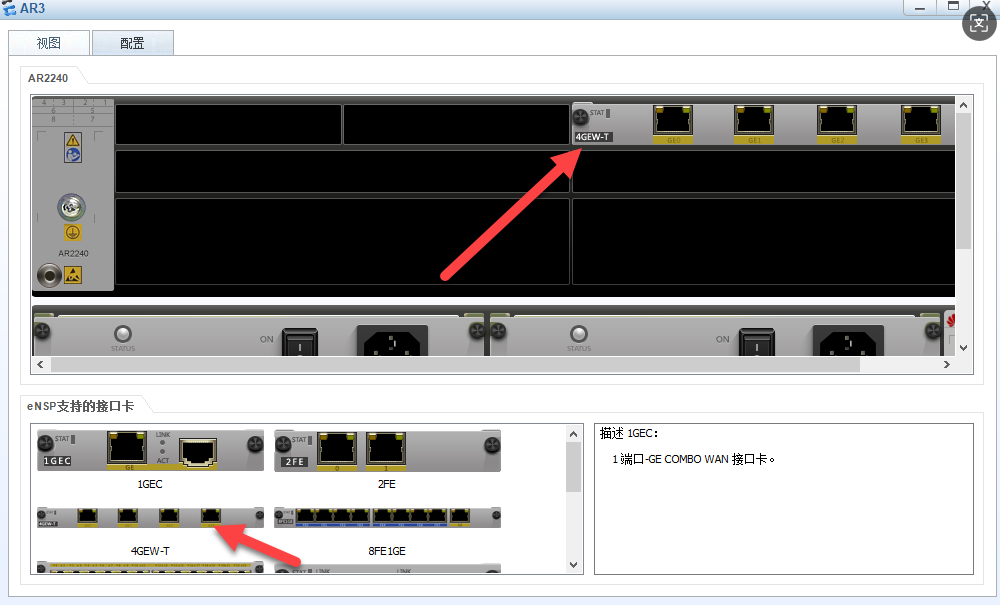
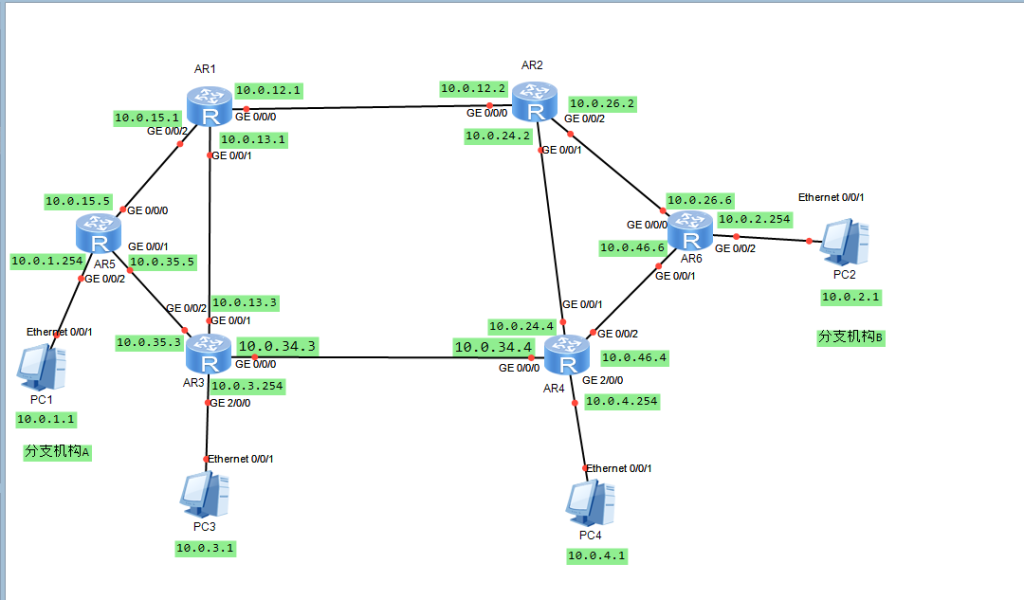
二、配置R1-R6的接口IP并开启接口:
<Huawei>
<Huawei>system-view
Enter system view, return user view with Ctrl+Z.
[Huawei]undo info-center enable
Info: Information center is disabled.
[Huawei]sysname R1
[R1]interface g0/0/0
[R1-GigabitEthernet0/0/0]ip address 10.0.12.1 24
[R1-GigabitEthernet0/0/0]undo shutdown
Info: Interface GigabitEthernet0/0/0 is not shutdown.
[R1-GigabitEthernet0/0/0]quit
[R1]interface g0/0/1
[R1-GigabitEthernet0/0/1]ip address 10.0.13.1 24
[R1-GigabitEthernet0/0/1]undo shutdown
Info: Interface GigabitEthernet0/0/1 is not shutdown.
[R1-GigabitEthernet0/0/1]quit
[R1]interface g0/0/2
[R1-GigabitEthernet0/0/2]ip address 10.0.15.1 24
[R1-GigabitEthernet0/0/2]undo shutdown
Info: Interface GigabitEthernet0/0/2 is not shutdown.
[R1-GigabitEthernet0/0/2]quit
system-view
Enter system view, return user view with Ctrl+Z.
[Huawei]undo info-center enable
Info: Information center is disabled.
[Huawei]sysname R2
[R2]interface g0/0/0
[R2-GigabitEthernet0/0/0]ip address 10.0.12.2 24
[R2-GigabitEthernet0/0/0]undo shutdown
Info: Interface GigabitEthernet0/0/0 is not shutdown.
[R2-GigabitEthernet0/0/0]quit
[R2]interface g0/0/1
[R2-GigabitEthernet0/0/1]ip address 10.0.24.2 24
[R2-GigabitEthernet0/0/1]undo shutdown
Info: Interface GigabitEthernet0/0/1 is not shutdown.
[R2-GigabitEthernet0/0/1]quit
[R2]interface g0/0/2
[R2-GigabitEthernet0/0/2]ip address 10.0.26.2 24
[R2-GigabitEthernet0/0/2]undo shutdown
Info: Interface GigabitEthernet0/0/2 is not shutdown.
[R2-GigabitEthernet0/0/2]quit[Huawei]sysname R3
[R3]interface g0/0/0
[R3-GigabitEthernet0/0/0]ip address 10.0.34.3 24
[R3-GigabitEthernet0/0/0]undo shutdown
Info: Interface GigabitEthernet0/0/0 is not shutdown.
[R3-GigabitEthernet0/0/0]quit
[R3]interface g0/0/1
[R3-GigabitEthernet0/0/1]ip address 10.0.13.3 24
[R3-GigabitEthernet0/0/1]undo shutdown
Info: Interface GigabitEthernet0/0/1 is not shutdown.
[R3-GigabitEthernet0/0/1]quit
[R3]interface g2/0/0
[R3-GigabitEthernet2/0/0]ip address 10.0.3.254 24
[R3-GigabitEthernet2/0/0]undo shutdown
Info: Interface GigabitEthernet2/0/0 is not shutdown.
[R3-GigabitEthernet2/0/0]quitsystem-view
Enter system view, return user view with Ctrl+Z.
[Huawei]undo info-center enable
Info: Information center is disabled.
[Huawei]sysname R4
[R4]interface g0/0/0
[R4-GigabitEthernet0/0/0]ip address 10.0.34.4 24
[R4-GigabitEthernet0/0/0]undo shutdown
Info: Interface GigabitEthernet0/0/0 is not shutdown.
[R4-GigabitEthernet0/0/0]quit
[R4]interface g0/0/1
[R4-GigabitEthernet0/0/1]ip address 10.0.24.4 24
[R4-GigabitEthernet0/0/1]undo shutdown
Info: Interface GigabitEthernet0/0/1 is not shutdown.
[R4-GigabitEthernet0/0/1]quit
[R4]interface g0/0/2
[R4-GigabitEthernet0/0/2]ip address 10.0.46.4 24
[R4-GigabitEthernet0/0/2]undo shutdown
Info: Interface GigabitEthernet0/0/2 is not shutdown.
[R4-GigabitEthernet0/0/2]quit
[R4]interface g2/0/0
[R4-GigabitEthernet2/0/0]ip address 10.0.4.254 24
[R4-GigabitEthernet2/0/0]undo shutdown
Info: Interface GigabitEthernet2/0/0 is not shutdown.
[R4-GigabitEthernet2/0/0]quit<Huawei>system-view
Enter system view, return user view with Ctrl+Z.
[Huawei]undo info-center enable
Info: Information center is disabled.
[Huawei]sysname R1
[R1]interface g0/0/0
[R1-GigabitEthernet0/0/0]quit
[R1]sysname R5
[R5]
<R5>system-view
Enter system view, return user view with Ctrl+Z.
[R5]interface g0/0/0
[R5-GigabitEthernet0/0/0]ip address 10.0.15.5 24
[R5-GigabitEthernet0/0/0]undo shutdown
Info: Interface GigabitEthernet0/0/0 is not shutdown.
[R5-GigabitEthernet0/0/0]quit
[R5]interface g0/0/1
[R5-GigabitEthernet0/0/1]ip address 10.0.35.5 24
[R5-GigabitEthernet0/0/1]undo shutdown
Info: Interface GigabitEthernet0/0/1 is not shutdown.
[R5-GigabitEthernet0/0/1]quit
[R5]interface g0/0/2
[R5-GigabitEthernet0/0/2]ip address 10.0.1.254 24
[R5-GigabitEthernet0/0/2]undo shutdown
Info: Interface GigabitEthernet0/0/2 is not shutdown.
[R5-GigabitEthernet0/0/2]quit<Huawei>system-view
Enter system view, return user view with Ctrl+Z.
[Huawei]undo info-center enable
Info: Information center is disabled.
[Huawei]sysname R6
[R6]interface g0/0/0
[R6-GigabitEthernet0/0/0]ip address 10.0.26.6 24
[R6-GigabitEthernet0/0/0]undo shutdown
Info: Interface GigabitEthernet0/0/0 is not shutdown.
[R6-GigabitEthernet0/0/0]quit
[R6]interface g0/0/1
[R6-GigabitEthernet0/0/1]ip address 10.0.46.6 24
[R6-GigabitEthernet0/0/1]undo shutdown
Info: Interface GigabitEthernet0/0/1 is not shutdown.
[R6-GigabitEthernet0/0/1]quit
[R6]interface g0/0/2
[R6-GigabitEthernet0/0/2]ip address 10.0.2.254 24
[R6-GigabitEthernet0/0/2]undo shutdown
Info: Interface GigabitEthernet0/0/2 is not shutdown.
[R6-GigabitEthernet0/0/2]quit三、配置R1-R4 OSPF1骨干区域area 0:
<R1>system-view
Enter system view, return user view with Ctrl+Z.
[R1]ospf 1
[R1-ospf-1]area 0
[R1-ospf-1-area-0.0.0.0]network 10.0.12.0 0.0.0.255
[R1-ospf-1-area-0.0.0.0]network 10.0.13.0 0.0.0.255
[R1-ospf-1-area-0.0.0.0]quit
[R1-ospf-1]
<R2>system-view
Enter system view, return user view with Ctrl+Z.
[R2]ospf 1
[R2-ospf-1]area 0
[R2-ospf-1-area-0.0.0.0]network 10.0.12.0 0.0.0.255
[R2-ospf-1-area-0.0.0.0]network 10.0.24.0 0.0.0.255
[R2-ospf-1-area-0.0.0.0]quit
[R2-ospf-1]quit<R3>system-view
Enter system view, return user view with Ctrl+Z.
[R3]ospf 1
[R3-ospf-1]area 0
[R3-ospf-1-area-0.0.0.0]network 10.0.13.0 0.0.0.255
[R3-ospf-1-area-0.0.0.0]network 10.0.34.0 0.0.0.255
[R3-ospf-1-area-0.0.0.0]network 10.0.3.0 0.0.0.255
[R3-ospf-1-area-0.0.0.0]quit
[R3-ospf-1]quit<R4>system-view
Enter system view, return user view with Ctrl+Z.
[R4]ospf 1
[R4-ospf-1]area 0
[R4-ospf-1-area-0.0.0.0]network 10.0.34.0 0.0.0.255
[R4-ospf-1-area-0.0.0.0]network 10.0.24.0 0.0.0.255
[R4-ospf-1-area-0.0.0.0]network 10.0.4.0 0.0.0.255
[R4-ospf-1-area-0.0.0.0]quit
[R4-ospf-1]quit四、R4下查看路由表信息
[R4]display ip routing-table 查看路由表信息
Route Flags: R - relay, D - download to fib
------------------------------------------------------------------------------
Routing Tables: Public
         Destinations : 19       Routes : 19

Destination/Mask    Proto   Pre  Cost      Flags NextHop         Interface

       10.0.3.0/24  OSPF    10   2           D   10.0.34.3       GigabitEthernet
0/0/0
       10.0.4.0/24  Direct  0    0           D   10.0.4.254      GigabitEthernet
2/0/0
     10.0.4.254/32  Direct  0    0           D   127.0.0.1       GigabitEthernet
2/0/0
     10.0.4.255/32  Direct  0    0           D   127.0.0.1       GigabitEthernet
2/0/0
      10.0.12.0/24  OSPF    10   2           D   10.0.24.2       GigabitEthernet
0/0/1
      10.0.13.0/24  OSPF    10   2           D   10.0.34.3       GigabitEthernet
0/0/0
      10.0.24.0/24  Direct  0    0           D   10.0.24.4       GigabitEthernet
0/0/1
      10.0.24.4/32  Direct  0    0           D   127.0.0.1       GigabitEthernet
0/0/1
    10.0.24.255/32  Direct  0    0           D   127.0.0.1       GigabitEthernet
0/0/1
      10.0.34.0/24  Direct  0    0           D   10.0.34.4       GigabitEthernet
0/0/0
      10.0.34.4/32  Direct  0    0           D   127.0.0.1       GigabitEthernet
0/0/0
    10.0.34.255/32  Direct  0    0           D   127.0.0.1       GigabitEthernet
0/0/0
      10.0.46.0/24  Direct  0    0           D   10.0.46.4       GigabitEthernet
0/0/2
      10.0.46.4/32  Direct  0    0           D   127.0.0.1       GigabitEthernet
0/0/2
    10.0.46.255/32  Direct  0    0           D   127.0.0.1       GigabitEthernet
0/0/2
      127.0.0.0/8   Direct  0    0           D   127.0.0.1       InLoopBack0
      127.0.0.1/32  Direct  0    0           D   127.0.0.1       InLoopBack0
127.255.255.255/32  Direct  0    0           D   127.0.0.1       InLoopBack0
255.255.255.255/32  Direct  0    0           D   127.0.0.1       InLoopBack0
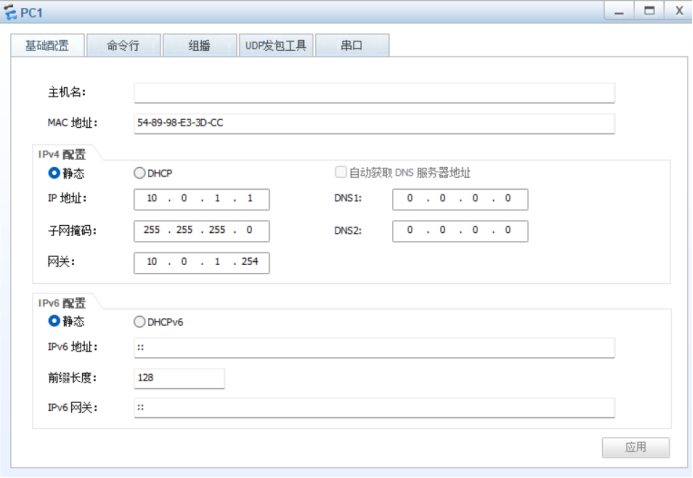
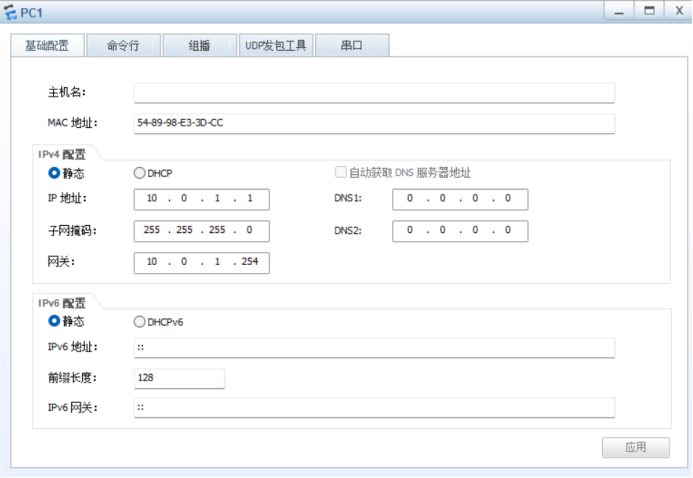
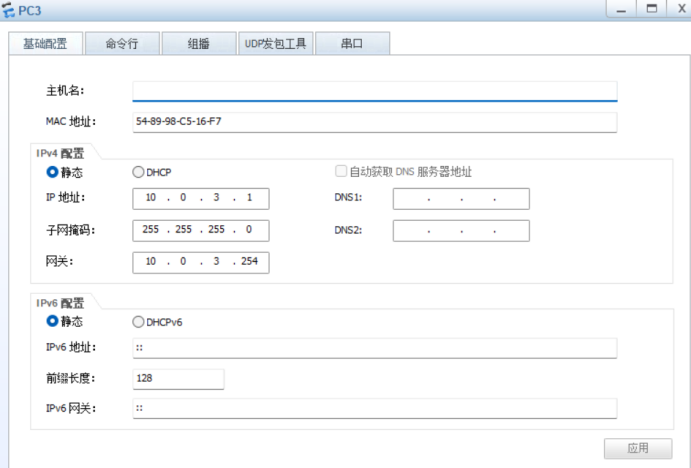
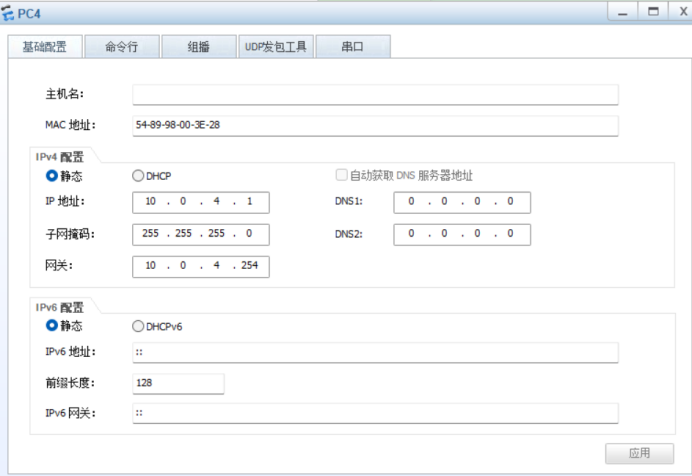
五、PC1-4 配置IP地址:
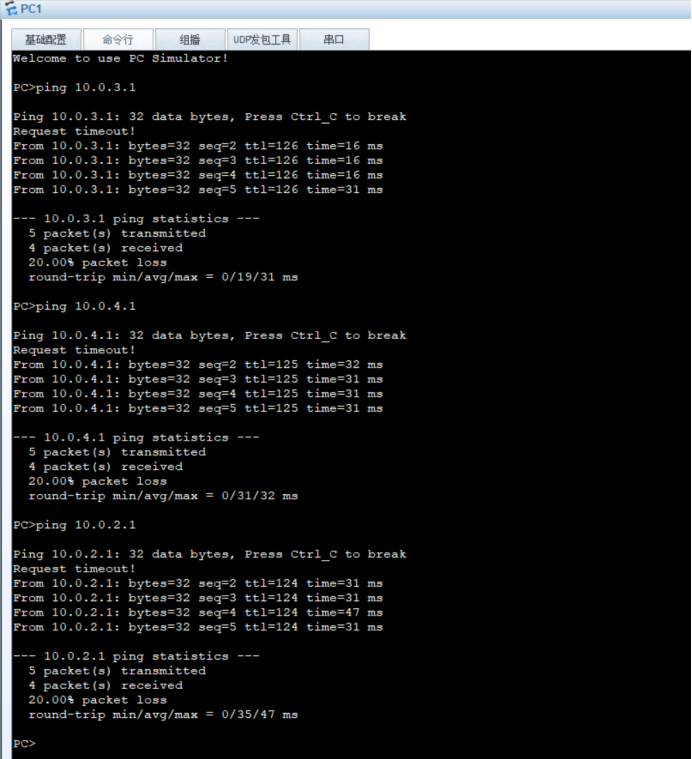
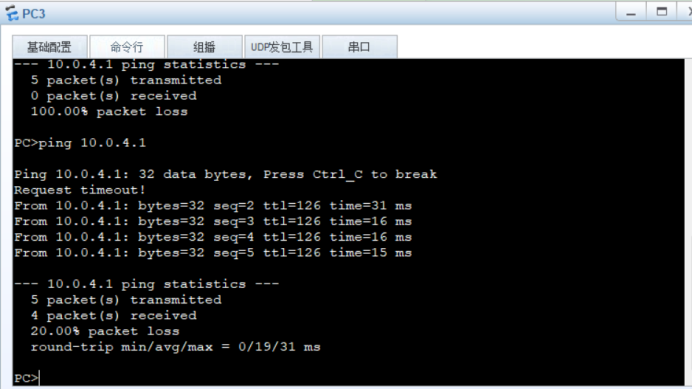
六、测试骨干区域是否通信正常:
七、配置非骨干区域:
<r1>system-view 进入视图模式
Enter system view, return user view with Ctrl+Z.
[r1]ospf 1		进入ospf进程号是1(进程号范围:1-255)
[r1-ospf-1]area 1 宣告是骨干区域area0非骨干区域area1
[r1-ospf-1-area-0.0.0.1]network 10.0.15.0 0.0.0.255	宣告的网段10.0.15.0,反掩码0.0.0.255
[r1-ospf-1-area-0.0.0.1]quit 退出
[r1-ospf-1]quit 退出
<r3>system-view 进入视图模式
Enter system view, return user view with Ctrl+Z.
[r3]ospf 1 进入ospf进程号是1(进程号范围:1-255)
[r3-ospf-1]area 1 宣告是非骨干区域area1
[r3-ospf-1-area-0.0.0.1]network 10.0.35.0 0.0.0.255 宣告的网段10.0.35.0,反掩码0.0.0.255
[r3-ospf-1-area-0.0.0.1]quit 退出
[r3-ospf-1]quit 退出<r5>system-view 进入视图模式
Enter system view, return user view with Ctrl+Z.
[r5]ospf 1 进入ospf进程号是1(进程号范围:1-255)
[r5-ospf-1]area 1 宣告是非骨干区域area1
[r5-ospf-1-area-0.0.0.1]network 10.0.1.0 0.0.0.255 宣告的网段10.0.1.0,反掩码0.0.0.255
[r5-ospf-1-area-0.0.0.1]network 10.0.15.0 0.0.0.255 宣告的网段10.0.15.0,反掩码0.0.0.255
[r5-ospf-1-area-0.0.0.1]network 10.0.35.0 0.0.0.255 宣告的网段10.0.35.0,反掩码0.0.0.255
[r5-ospf-1-area-0.0.0.1]quit 退出
[r5-ospf-1]quit 退出<r2>system-view 进入视图模式
Enter system view, return user view with Ctrl+Z.
[r2]ospf 1 进入ospf进程号是1(进程号范围:1-255)
[r2-ospf-1]area 2 非骨干区域area2
[r2-ospf-1-area-0.0.0.2]network 10.0.26.0 0.0.0.255 宣告的网段10.0.26.0,反掩码0.0.0.255
[r2-ospf-1-area-0.0.0.2]quit 退出
[r2-ospf-1]quit 退出<r4>system-view 进入视图模式
Enter system view, return user view with Ctrl+Z.
[r4]ospf 1 进入ospf进程号是1(进程号范围:1-255)
[r4-ospf-1]area 2 宣告是非骨干区域area2
[r4-ospf-1-area-0.0.0.2]network 10.0.46.0 0.0.0.255 宣告的网段10.0.46.0,反掩码0.0.0.255
[r4-ospf-1-area-0.0.0.2]quit 退出
[r4-ospf-1]quit 退出<r6>system-view 进入视图模式
Enter system view, return user view with Ctrl+Z.
[r6]ospf 1 进入ospf进程号是1(进程号范围:1-255)
[r6-ospf-1]area 2 宣告是非骨干区域area2
[r6-ospf-1-area-0.0.0.2]network 10.0.2.0 0.0.0.255 宣告的网段10.0.2.0,反掩码0.0.0.255
[r6-ospf-1-area-0.0.0.2]network 10.0.26.0 0.0.0.255 宣告的网段10.0.26.0,反掩码0.0.0.255
[r6-ospf-1-area-0.0.0.2]network 10.0.46.0 0.0.0.255 宣告的网段10.0.46.0,反掩码0.0.0.255
[r6-ospf-1-area-0.0.0.2]quit 退出
[r6-ospf-1]quit 退出八、测试全网互通: