一、实验拓扑图
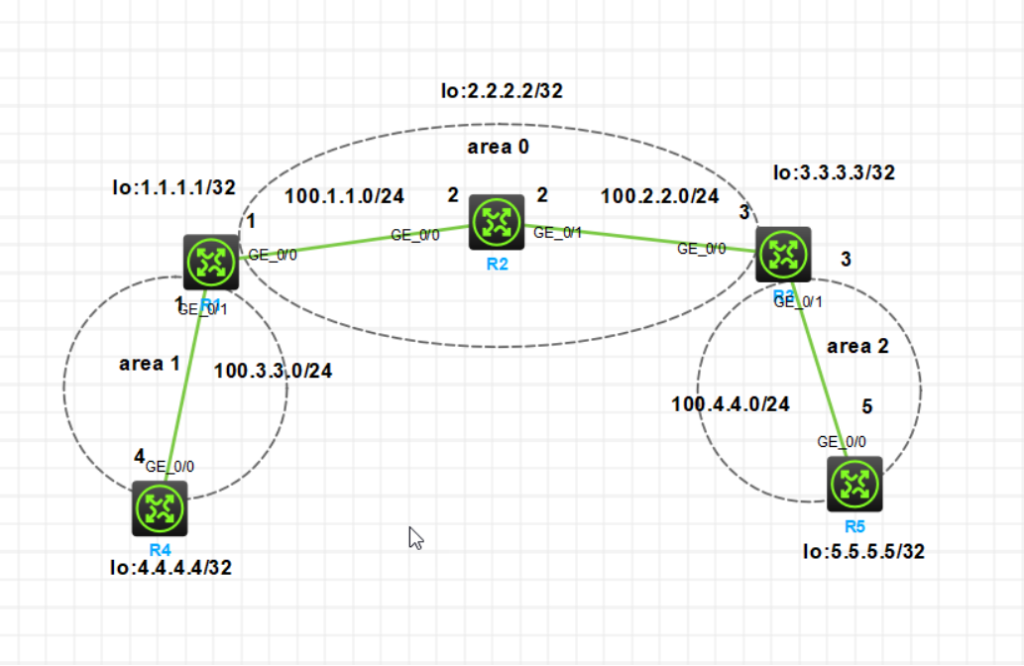
二、R1设置IP
<H3C>system-view
System View: return to User View with Ctrl+Z.
[H3C]undo info-center enable
Information center is disabled.
[H3C]sysname R1
[R1]interface loopback 0
[R1-LoopBack0]ip address 1.1.1.1 32
[R1-LoopBack0]quit
[R1]interface g 0/1
[R1-GigabitEthernet0/1]ip address 100.3.3.1 24
[R1-GigabitEthernet0/1]undo shutdown
[R1-GigabitEthernet0/1]quit
[R1]interface g 0/0
[R1-GigabitEthernet0/0]ip address 100.1.1.1 24
[R1-GigabitEthernet0/0]undo shutdown
[R1-GigabitEthernet0/0]quit
[R1]
三、R2设置IP
<H3C>system-view
System View: return to User View with Ctrl+Z.
[H3C]undo info-center enable
Information center is disabled.
[H3C]sysname R2
[R2]interface loopback 0
[R2-LoopBack0]ip address 2.2.2.2 32
[R2-LoopBack0]quit
[R2]interface g 0/0
[R2-GigabitEthernet0/0]ip address 100.1.1.2 24
[R2-GigabitEthernet0/0]undo shutdown
[R2-GigabitEthernet0/0]quit
[R2]interface g 0/1
[R2-GigabitEthernet0/1]ip address 100.2.2.2 24
[R2-GigabitEthernet0/1]undo shutdown
[R2-GigabitEthernet0/1]quit
[R2]
四、R3设置IP
<H3C>system-view
System View: return to User View with Ctrl+Z.
[H3C]sysname r3
[r3]interface loopback 0
[r3-LoopBack0]ip address 3.3.3.3 32
[r3-LoopBack0]quit
[r3]interface g 0/0
[r3-GigabitEthernet0/0]ip address 100.2.2.3 24
[r3-GigabitEthernet0/0]undo shutdown
[r3-GigabitEthernet0/0]quit
[r3]interface g 0/1
[r3-GigabitEthernet0/1]ip address 100.4.4.3 24
[r3-GigabitEthernet0/1]undo shutdown
[r3-GigabitEthernet0/1]quit
[r3]
五、R4设置IP
<H3C>system-view
System View: return to User View with Ctrl+Z.
[H3C]sysname r4
[r4]undo info-center enable
Information center is disabled.
[r4]interface loopback 0
[r4-LoopBack0]ip address 4.4.4.4 32
[r4-LoopBack0]quit
[r4]interface g 0/0
[r4-GigabitEthernet0/0]ip address 100.3.3.4 24
[r4-GigabitEthernet0/0]undo shutdown
[r4-GigabitEthernet0/0]quit
[r4]
六、R5设置IP
<H3C>system-view
System View: return to User View with Ctrl+Z.
[H3C]undo info-center enable
Information center is disabled.
[H3C]sysname r5
[r5]interface loopback 0
[r5-LoopBack0]ip address 5.5.5.5 32
[r5-LoopBack0]quit
[r5]interface g 0/0
[r5-GigabitEthernet0/0]ip address 100.4.4.5 24
[r5-GigabitEthernet0/0]undo shutdown
[r5-GigabitEthernet0/0]quit
[r5]
七、R1配置OSPF
[R1]ospf 1 router-id 1.1.1.1 使用OSPF协议,进程号是1,路由ID号是1.1.1.1
[R1-ospf-1]area 0 骨干区域area0
[R1-ospf-1-area-0.0.0.0]network 1.1.1.1 0.0.0.0 宣告的网段是1.1.1.1 反掩码是0.0.0.0
[R1-ospf-1-area-0.0.0.0]network 100.1.1.0 0.0.0.255 宣告的网段是100.1.1.0 反掩码是0.0.0.255
[R1-ospf-1-area-0.0.0.0]quit
[R1-ospf-1]area 1
[R1-ospf-1-area-0.0.0.1]network 100.3.3.0 0.0.0.255
[R1-ospf-1-area-0.0.0.1]quit
[R1-ospf-1]quit
[R1]ospf 1 router-id 1.1.1.1
[R1-ospf-1]area 0
[R1-ospf-1-area-0.0.0.0]network 1.1.1.1 0.0.0.0
[R1-ospf-1-area-0.0.0.0]network 100.1.1.0 0.0.0.255
[R1-ospf-1-area-0.0.0.0]quit
[R1-ospf-1]area 1
[R1-ospf-1-area-0.0.0.1]network 100.3.3.0 0.0.0.255
[R1-ospf-1-area-0.0.0.1]quit
[R1-ospf-1]
八、R2配置OSPF
[R2]ospf 1
[R2-ospf-1]ospf 1 router-id 2.2.2.2
[R2-ospf-1]area 0
[R2-ospf-1-area-0.0.0.0]network 2.2.2.2 0.0.0.0
[R2-ospf-1-area-0.0.0.0]network 100.1.1.0 0.0.0.255
[R2-ospf-1-area-0.0.0.0]network 100.2.2.0 0.0.0.255
[R2-ospf-1-area-0.0.0.0]quit
[R2-ospf-1]
九、R3配置OSPF
[r3]ospf 1 router-id 3.3.3.3
[r3-ospf-1]area 0
[r3-ospf-1-area-0.0.0.0]network 3.3.3.3 0.0.0.0
[r3-ospf-1-area-0.0.0.0]network 100.2.2.0 0.0.0.255
[r3-ospf-1-area-0.0.0.0]%May 13 14:51:42:194 2025 r3 OSPF/5/OSPF_NBR_CHG: OSPF 1 Neighbor 100.2.2.2(GigabitEthernet0/0) changed from LOADING to FULL.

[r3-ospf-1-area-0.0.0.0]quit
[r3-ospf-1]area 2
[r3-ospf-1-area-0.0.0.2]network 100.4.4.0 0.0.0.255
[r3-ospf-1-area-0.0.0.2]quit
十、R4配置OSPF
<r4>system-view
System View: return to User View with Ctrl+Z.
[r4]ospf 1 router-id 4.4.4.4
[r4-ospf-1]area 1
[r4-ospf-1-area-0.0.0.1]network 4.4.4.4 0.0.0.255
[r4-ospf-1-area-0.0.0.1]network 100.3.3.0 0.0.0.255
[r4-ospf-1-area-0.0.0.1]quit
[r4-ospf-1]
十一、R5配置OSPF
[r5]ospf 1 router-id 5.5.5.5 使用OSPF协议,进程号是1,路由ID号是5.5.5.5
[r5-ospf-1]area 2 非骨干区域area2(骨干区域area 0)
[r5-ospf-1-area-0.0.0.2]network 5.5.5.5 0.0.0.0 宣告的网段是5.5.5.5 反掩码是0.0.0.0
[r5-ospf-1-area-0.0.0.2]network 100.4.4.0 0.0.0.255 宣告的网段是100.4.4.0 反掩码是0.0.0.255
[r5-ospf-1-area-0.0.0.2]quit
[r5-ospf-1]quit
[r5]quit
十二、查看IP路由表信息
[r5]display ip routing-table  查看IP路由表信息

Destinations : 18       Routes : 18

Destination/Mask   Proto   Pre Cost        NextHop         Interface
0.0.0.0/32         Direct  0   0           127.0.0.1       InLoop0
1.1.1.1/32         O_INTER 10  3           100.4.4.3       GE0/0
2.2.2.2/32         O_INTER 10  2           100.4.4.3       GE0/0
3.3.3.3/32         O_INTER 10  1           100.4.4.3       GE0/0
4.4.4.4/32         O_INTER 10  4           100.4.4.3       GE0/0
5.5.5.5/32         Direct  0   0           127.0.0.1       InLoop0
100.1.1.0/24       O_INTER 10  3           100.4.4.3       GE0/0
100.2.2.0/24       O_INTER 10  2           100.4.4.3       GE0/0
100.3.3.0/24       O_INTER 10  4           100.4.4.3       GE0/0
100.4.4.0/24       Direct  0   0           100.4.4.5       GE0/0
100.4.4.5/32       Direct  0   0           127.0.0.1       InLoop0
100.4.4.255/32     Direct  0   0           100.4.4.5       GE0/0
127.0.0.0/8        Direct  0   0           127.0.0.1       InLoop0
127.0.0.1/32       Direct  0   0           127.0.0.1       InLoop0
127.255.255.255/32 Direct  0   0           127.0.0.1       InLoop0
224.0.0.0/4        Direct  0   0           0.0.0.0         NULL0
224.0.0.0/24       Direct  0   0           0.0.0.0         NULL0
255.255.255.255/32 Direct  0   0           127.0.0.1       InLoop0
[r5]